
From video testimonial to case study: turn customer videos into proof
Transcribe the video, label the speakers, map the transcript to challenge, solution and results, then check every quote and get the customer's approval.

Armin
Published 11 min read

Key takeaways
- A transcript turns a testimonial video into quotes you can check and copy word for word.
- List the customer's company and product names in Keyterms before you transcribe, or check those words closely afterwards.
- Map the transcript to challenge, solution and results, and leave the rest in the video.
- Quote the customer's exact words and confirm every number with them.
- Get written approval of the final text, because consent to a video may not cover it.
A testimonial video is persuasive, but you can't skim it or paste it into an email. A written case study fixes that, and a transcript gets you most of the way there. To go from video testimonial to case study, transcribe the video, label the customer's speech, mark the parts that describe the challenge, the solution and the results, and rebuild them as a short written story with exact quotes the customer has approved. The example further down is a real 36-second run, from upload to Word export.
How a case study differs from a testimonial
A testimonial is the customer's opinion in their own words, usually a minute or two. A case study tells the story around it: the problem they had, what they changed and what happened, with the customer's words as evidence. The video already holds that story in the customer's answers; the transcript lets you pull that story out and check it before you lay it out for readers who'd rather scan a page than watch.
What you need before you start
- The video. Upload the cleanest file you have, or paste its link on the web: PrismaScribe imports public videos from YouTube, Vimeo and other video sites. A private or password-protected video has to be downloaded and uploaded as a file.
- The questions the customer was answering, if it was an interview. They often become the structure of the case study. For new testimonials, ask three: what was it like before, what did you change, and what is it like now.
- Permission for the written version. A customer who signed a release (the consent form) for a video hasn't necessarily agreed to a written piece. Check it now.
Good to know: Keyterms, background noise removal and the Draft generator in the FAQ are on paid plans, $7, $20 or $40 a month and less if billed annually; see the pricing page.
Video testimonial to case study in five steps
- Set up the upload. Our video to text page lists the formats PrismaScribe accepts; it takes the audio out of MP4, MOV and other video files itself. In the upload dialog:
- Keyterms, right under Audio Language: add the customer's company name, product names and any jargon, the words most likely to be misheard. They count as 1.25 times the file's minutes. The field remembers your last list in that browser, and Save current list lets you save a list for each customer under My lists.
- Advanced Settings: Recognize Speakers is on by default; set How many speakers? to 2 for a one-on-one interview. No verbatim is off by default, which keeps every word as spoken, the safest choice for quotes. Our guide to choosing verbatim or clean text explains when each fits; running the file again for the other version uses its minutes twice.
- Remove background noise, for a testimonial filmed on a busy floor: it counts as 2 times the minutes and works on files up to 60 minutes and 500 MB.
- Label the speakers. Click a speaker's label, use Rename speaker (the pencil) and type "Interviewer" or the customer's name. With All paragraphs selected, the default, every paragraph from that voice updates.
- Mark the story. Select a line about the problem, the change or the result, and add a Note or a Bookmark from the toolbar that appears, so you can find it again.
- Check the quotes you plan to use against the audio (see the checklist below) and correct any word in the editor, which saves as you type.
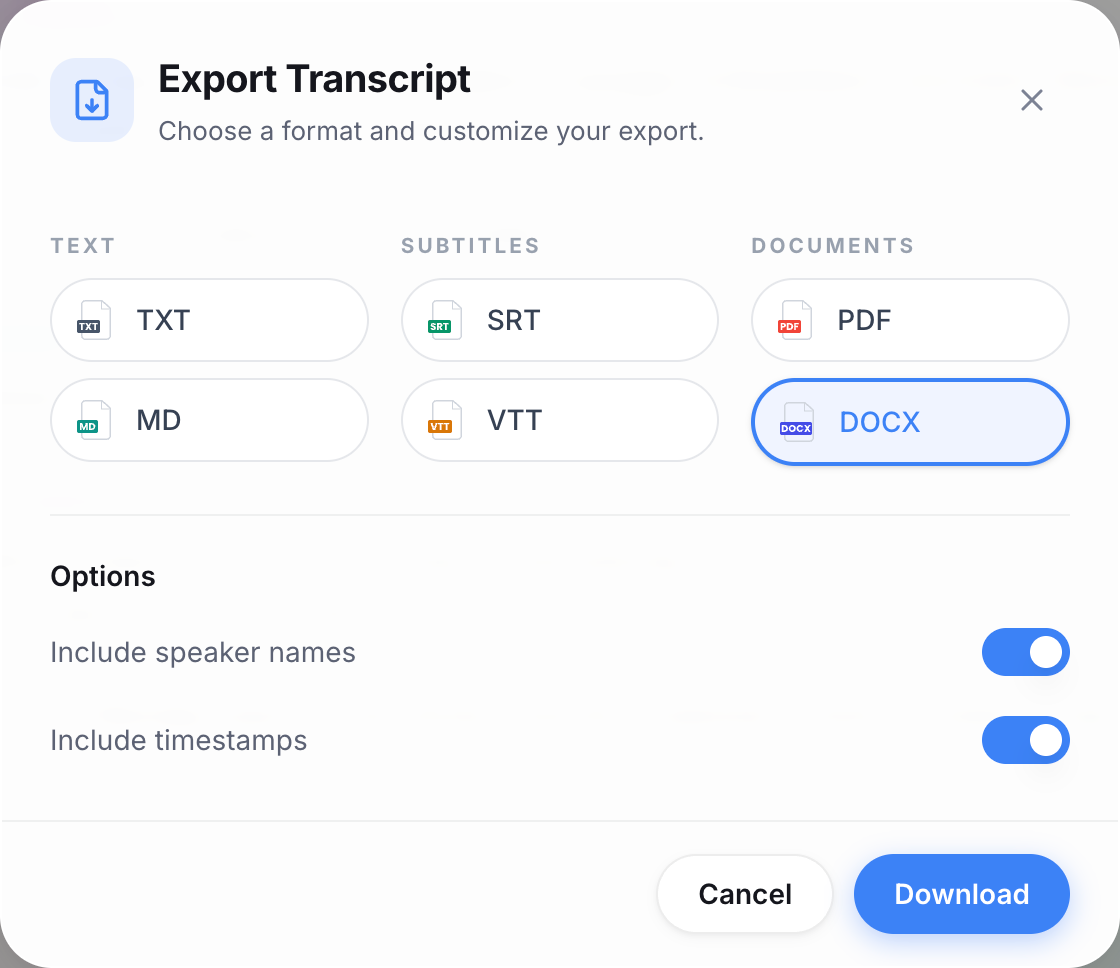
- Export to DOCX on the web. Include speaker names and Include timestamps are both on by default, so every quote keeps who said it and when. Our guide to turning audio into a finished Word document covers tidying the file. If you correct anything later, export again, because a downloaded file doesn't update.
Structure the case study from the transcript
Map the transcript to the parts of a case study:
- The customer describing what wasn't working becomes the challenge.
- Why they chose your product and how they set it up becomes the solution.
- What changed after they started becomes the results.
- A line that sums up how they feel becomes the pull quote, the one line set in large type.
- The customer's name, role and company become the attribution.
Keep the draft much shorter than the transcript, because speech wanders and repeats, and open with the result if it's strong.
A video testimonial to case study example, start to finish
Paste a link, get a searchable transcript
Free plan includes 30 minutes of transcription every month. No credit card.
To show the steps on real output, we made a short sample testimonial for this guide: a 36-second script read by two computer-generated voices, an interviewer and Dana, the operations manager at Brightlane. Brightlane and Dana are invented; everything below is what PrismaScribe returned for that file. We used the audio track as an MP3; the video file works the same way. Expect more corrections on a real, unscripted testimonial.
We uploaded the MP3 with Recognize Speakers on and the number of speakers set to 2, left the language on Detect automatically, then renamed Speaker 1 to "Interviewer" and Speaker 2 to "Dana, Brightlane". The transcript was ready in under 20 seconds and used 1 minute of the month's allowance, because each file counts in whole minutes, rounded up.
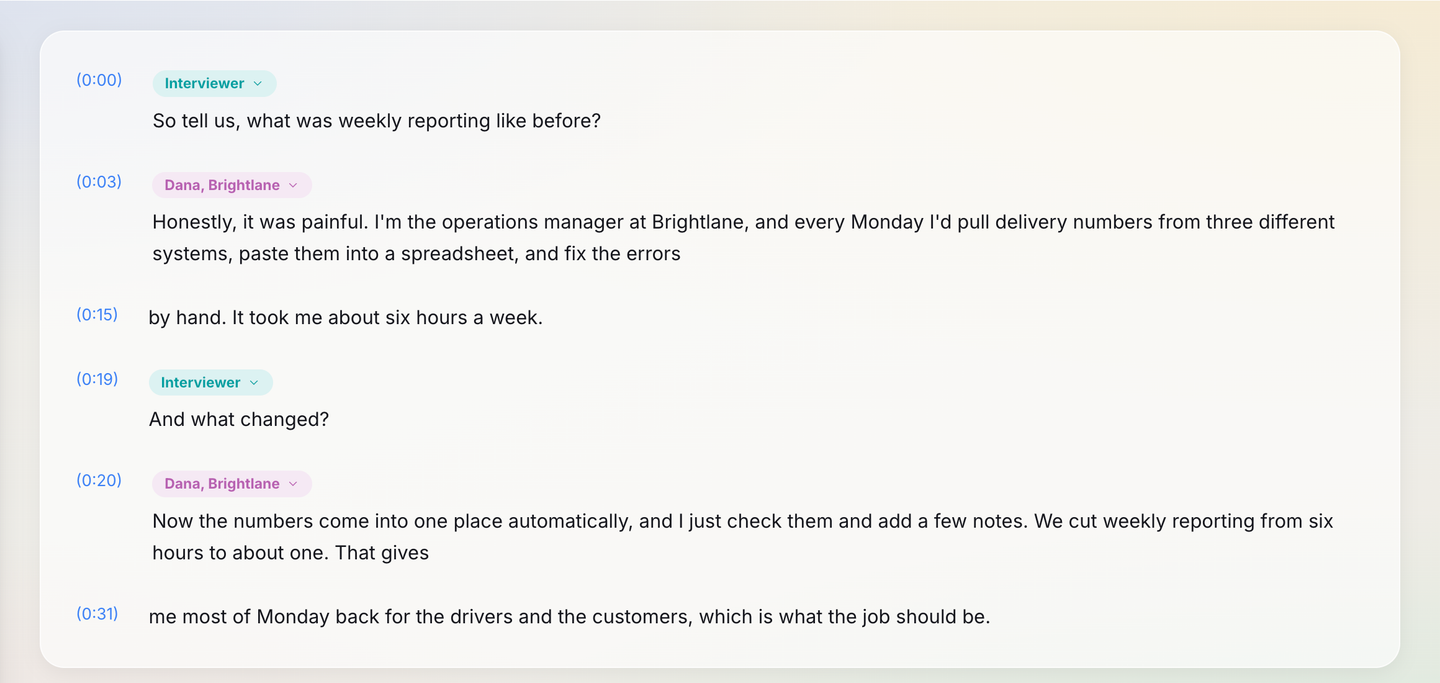
This is the transcript as it came back, word for word:
- (0:00) Interviewer: So tell us, what was weekly reporting like before?
- (0:03) Dana, Brightlane: Honestly, it was painful. I'm the operations manager at Brightlane, and every Monday I'd pull delivery numbers from three different systems, paste them into a spreadsheet, and fix the errors
- (0:15) by hand. It took me about six hours a week.
- (0:19) Interviewer: And what changed?
- (0:20) Dana, Brightlane: Now the numbers come into one place automatically, and I just check them and add a few notes. We cut weekly reporting from six hours to about one. That gives
- (0:31) me most of Monday back for the drivers and the customers, which is what the job should be.
Long answers come back as several timed paragraphs, sometimes split mid-sentence ("fix the errors" and "by hand"), so join the pieces when you copy a quote; in the editor, Backspace at the start of a paragraph merges it with the one before. The paragraph timestamps show roughly where each answer sits in the video. For the exact second a quote starts, click its first word, as in the checklist below.
Built from those lines, a short sample case study reads:
How Brightlane cut weekly reporting from six hours to about one. Every Monday, Brightlane's operations manager pulled delivery numbers from three different systems, pasted them into a spreadsheet and fixed the errors by hand: about six hours a week. Now the numbers come into one place automatically, and the manager only checks them and adds a few notes. "We cut weekly reporting from six hours to about one," says Dana, operations manager at Brightlane. "That gives me most of Monday back for the drivers and the customers, which is what the job should be."
Here is what happened to each line:
- Headline: the result, in the customer's own figures.
- Paraphrased: the challenge and the change, in the writer's words but built only from what Dana said. "About six hours a week" stays "about six hours", not "six hours or more", which would overstate the claim.
- Quoted exactly: the result and the line about Monday, joined across the paragraph break, because they carry the number and the feeling a buyer remembers.
- Left out: "Honestly, it was painful." It sets the mood in the video, but on the page the numbers make the point.
- Missing: the solution. Dana says the numbers "come into one place automatically" but never what the team set up or why it chose your product. A short testimonial rarely covers that, so ask the customer a follow-up question before you write the solution paragraph.
- Flagged to confirm: "six hours" and "about one". They're the customer's claim, so they go back to Dana before anything is published.
The Word export keeps the same structure: each speaker's name above their paragraphs and the timestamp in brackets at the start of every paragraph, so "[0:20] Now the numbers come into one place automatically" tells you which part of the video that answer is in. The quoted line itself starts a few seconds into that paragraph.
Check every quote against the recording
Before a quote goes into the draft:
- Click its first word in the transcript. The player jumps to that moment.
- Listen to the whole line and compare it word by word.
- Listen hardest to numbers ("six" and "sixty", "fifteen" and "fifty") and to names. A coined name like Brightlane is exactly the kind of word to put in Keyterms.
- Fix anything wrong in the editor, then select the line and copy it from the transcript, so the quote matches what was said.
- Watch the original video for tone. A customer can say something flatly that reads as glowing on paper, or the reverse.
Transcription makes mistakes, ours included, especially with unusual names and on noisy recordings. The case study is only as trustworthy as this check.
Choose quotes and get approval
Pick quotes that sound like a person talking and carry a specific idea. "It saved us a lot of time" is weak; a line that names the task, the before and the after is something a buyer can picture. Trim for length, but don't change a quote's meaning or stitch two statements into one sentence. Attribute each quote with the customer's name, title and company, and don't round up or add metrics they didn't give you.
Then send the full draft, quotes included, and ask for a written yes. Customers often want to adjust a phrase or remove something their legal team won't allow, and it's better to hear that now. If the customer speaks for a company, ask who there can approve the use of their name and words. Keep the approval on file with the date and the version they saw. If they reword a quote, use their new wording in the text, and don't pair that line with the video clip, where they still say the old one.
Pair the case study with the clip
Link the video near the top of the case study, and consider embedding the strongest thirty seconds next to the quote it matches; clicking the quote's first word shows where to cut. If you post the clip with captions, export SRT or VTT from the web and switch off Include speaker names, which is on by default, so the captions don't show "Interviewer". The timings follow the full video, so caption the full video, or transcribe the finished excerpt on its own, which for a 30-second clip uses 1 minute. Our MP4 to SRT page walks through the export.
Turn the same transcript into a case-study video
A short case-study video can reuse the same work. The map becomes the edit list: one clip for the challenge, one for the solution and one for the result, in that order, about 60 to 90 seconds in all. Find each clip's in and out points by clicking its first and last words, and note the times next to the quotes. If a part is missing, like the solution in our example, record a follow-up answer or carry that step on a title card.
What it costs
Testimonials are short, so they fit even the Free plan: 30 minutes a month, 15 a day and 15 minutes per file, with files up to 500 MB, which is worth checking for a high-resolution video. On Free, a longer upload is transcribed only for its first 15 minutes unless you have top-up hours. Files and transcripts stay private to your account unless you share them, so share the transcript only with the people working on the case study.
Start with your best existing video, and keep the result as the template for the next one.
Frequently asked questions
Can I use a private Vimeo or Wistia video?
Not by its link. Link import reads public videos only, from YouTube, Vimeo and other supported sites, and Wistia links aren't supported. If your video host lets you download the original file, download it and upload that. Files can be up to 2 GB on Starter and Premium and 5 GB on Pro.
Can PrismaScribe draft the case study for me?
On a paid plan, the Draft generator turns a transcript into a first draft of a written piece, such as a report or a blog post, for one AI generation from your monthly pool. Treat it as a starting point: it rewrites what was said, so paste every quote from the transcript itself, not from the draft.
Can you transcribe only part of a long video?
Yes, if you import it from a link. On the web you can trim an imported video to the part you want, so a 40-minute webinar with a two-minute testimonial only uses about two minutes. This works on Free too, because only the trimmed part counts against the 15-minute file limit. An uploaded file is transcribed in full on a paid plan, up to its file-length limit.
Can the case study be translated for other markets?
You can translate the transcript into 99+ languages and draft from the translation. Translation is metered by characters, 20,000 a month on Free, separately from transcription minutes. Have a native speaker check every quote before it carries the customer's name, and get the customer's approval on the translated version as well, since a quote can shift in meaning between languages.


Turn hours of audio into searchable text
Upload a file or paste a link. Speaker labels, translations, and six export formats included.