
Create flashcards from recorded lectures: decide what earns a card
Transcribe a lecture, fix the key terms, generate a flashcard deck, then check each card against what the lecturer actually said before you revise.

Armin
Published 9 min read

Key takeaways
- Fix the transcript first: a misheard term becomes a wrong card you then practice.
- A card should test one thing with one right answer.
- Free takes recordings up to 15 minutes, so a full lecture needs a paid plan or top-up hours.
- Each deck uses one AI generation from a monthly pool: 3 on Free, 30 on Starter.
- Edit decks on the web; practice them in the iPhone app, which brings cards back on a schedule.
A lecture recording is hard to review the night before an exam. A short deck of flashcards is better, but only if the cards ask the right things. To create flashcards from recorded lectures, transcribe the recording with PrismaScribe, fix the terms it got wrong, generate a deck, and check every card against what the lecturer said, as we did with a real deck below.
What you need before you start
Two limits decide whether this works for you. Free takes files and browser recordings up to 15 minutes, so a full lecture needs a paid plan or top-up hours. And the deck is made and edited on the web or in the iPhone app, but practice mode, which brings each card back just before you'd forget it (spaced repetition), is in the iPhone app only. On the web you can read, edit and share a deck by link; it doesn't export to other flashcard apps.
Fix the transcript before you generate anything
Cards inherit whatever the transcript says. If a term was misheard and a card is built around it, you'll practice the wrong answer until it feels right.
So read the transcript with the audio playing:
- Click a word to move the player to that moment, then play it.
- Look hardest at technical terms, names, formulas read aloud and numbers.
- Correct them right in the web editor, which saves as you type.
- Use Find in transcript to step through other places the same term appears. A term that's wrong once is often wrong elsewhere, and each copy is fixed by hand.
On a paid plan you can head most of these off before transcribing. Type the course's terms in the Keyterms field, right under Audio Language in the upload dialog, or open Browse: the Science & Academia group has lists such as Biology & Genetics. Add the lecture's own terms either way, since a general list won't hold them all; the biology list has cytoplasm and mitochondria, but not glycolysis or pyruvate. Keyterms count as 1.25 times the file's minutes.
How to create flashcards from recorded lectures, step by step
- Record the lecture. Ask your instructor first, since recording policies vary. Any recorder works, and PrismaScribe also records in your browser and in the iPhone app.
- Upload the file on the web or in the app.
- Review the transcript and fix the key terms.
- Generate the deck. On the web, open AI Tools on the transcript and choose Study cards, the flashcard deck. The menu marks it "iOS" because practice happens in the app, but generating works on the web, on every plan.
- Pick the options. Cards: Auto, 10, 20 or 30. Style: Q&A, Term & definition, or Cloze (fill in the blank). Difficulty, Output language and an optional Focus on… line, which helps when you only need one part of a long lecture.
- Read each card against the transcript. Keep the strong ones, and rewrite or delete the weak ones.
The deck appears under the recording's Outputs, named after the file, so give the recording the lecture's date and topic. Our lecture transcription page has more on recording and uploading class audio.
Decide what deserves a card
A card should test one thing you'll be asked to recall, with one right answer. Good candidates are definitions, cause-and-effect pairs, formulas with their conditions, contrasts between two similar ideas, and anything the lecturer flags as important. Long stories and lists that need a page of explanation make poor cards.
Weak cards usually come from questions that are too broad, or that have more than one right answer. For a lecture on cell respiration:
- "What did the lecturer say about glycolysis?" is too open to answer the same way twice. Ask "Where in the cell does glycolysis take place?"
- "Explain the whole process of respiration" is too much for one card. Ask "What does glycolysis turn one glucose molecule into?"
- "Why does oxygen matter?" has several valid answers. Ask "Which stage of respiration uses oxygen as the final electron acceptor?"
Paste a link, get a searchable transcript
Free plan includes 30 minutes of transcription every month. No credit card.
A generated deck can include cards like these. That's normal for a first draft, and the edit takes seconds.
A weak card, fixed in the deck
To test this, we made a 53-second intro-biology passage on glycolysis, read by a computer voice, and uploaded it with the default settings and no Keyterms. The transcript was ready about 12 seconds after we clicked Transcribe and used one minute of the allowance. Every term came back right, including glycolysis, pyruvate, cytoplasm, mitochondria, ATP and NADH, so there was nothing to fix. A real lecture hall, with a microphone at the back and questions from the room, won't be this clean.
We then generated Study cards with the default options. The deck was ready about 3 seconds later, used one AI generation and held 11 Q&A cards. Three of them, exactly as generated:
- Front: "Where does glycolysis occur within the cell?" Back: "It takes place in the cytoplasm."
- Front: "Does glycolysis require oxygen?" Back: "No, glycolysis is an anaerobic process that does not require oxygen."
- Front: "What are the primary outputs of glycolysis per glucose molecule?" Back: "The outputs are two pyruvate molecules, a net of two ATP, and two NADH."
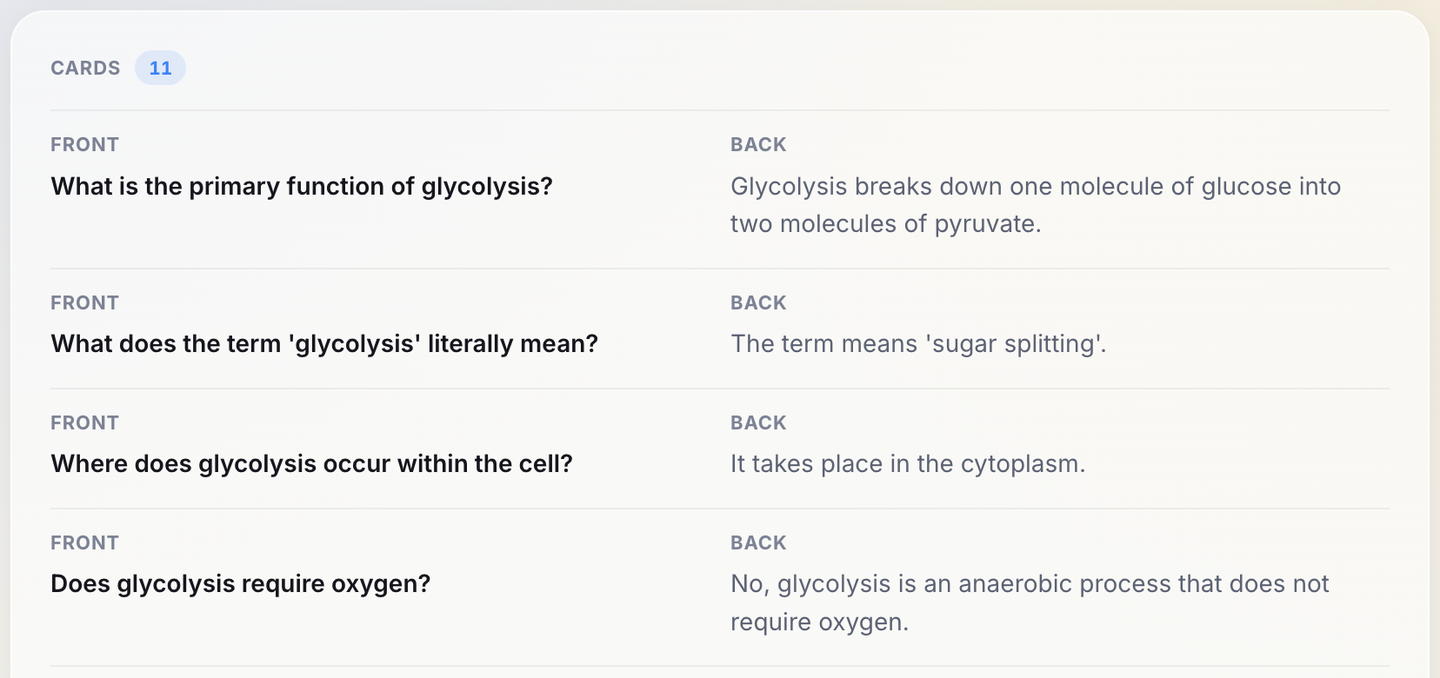
Every fact on all 11 cards matched the lecture. The only word the lecturer never said was "anaerobic", on the oxygen card above, where the lecture said "it doesn't need oxygen".
The weak one was card 8. Its front asked "How many ATP molecules are produced during glycolysis?" and its back said "Glycolysis produces four ATP molecules, resulting in a net gain of two ATP." A student could fairly answer "two" (net) or "four" (gross), and the card overlaps card 9, which asks for the net gain.

To fix a card on the web, click Edit on the deck. Every card turns into a Front and a Back box, with a bin icon to delete it and Add card at the end. We rewrote card 8, then clicked Done:
- Front: "How many ATP does glycolysis make in total, before you subtract the two it spends?"
- Back: "Four ATP in total (gross). Minus the two spent at the start, that leaves a net gain of two ATP per glucose."

It's better, not perfect: the new question gives away card 7's answer (the two ATP spent at the start), and the back still teaches both figures. A tighter version asks "How many ATP does glycolysis produce in total, gross?" with "Four" on the back. Check any rewrite against the transcript before you move on.
Plan the cards for a full lecture
For a full lecture, write your own list before you read the generated deck, then match the two. For a 12-minute stretch on cell respiration, you might pick three definitions the lecturer gave, two locations (where each stage happens), two contrasts (aerobic and anaerobic routes), two numbers flagged as worth remembering and one point marked "you'll see this again". A card in the deck you didn't expect may still be worth keeping; anything on your list the deck missed is a card to add.
Check every number and formula against your textbook or slides. Lecturers round and simplify, and sources differ: newer textbooks give about 30 to 32 ATP per glucose for the whole of respiration, older ones 36 to 38. If your course materials disagree with the lecture, ask your instructor and note the answer on the card.
For a 90-minute lecture, use the timestamps to split it into topics, or use Focus on… to make a deck for one topic at a time. Keep each card answerable in a sentence, and split it if the answer needs a paragraph.
Budget your generations and minutes
Each deck uses one AI generation from your plan's monthly pool, which summaries, quizzes and meeting minutes also draw from: 3 a month on Free, 30 on Starter, 100 on Premium and 200 on Pro. A summary and a deck for each lecture is two generations. Translation is metered separately, by characters.
Each file rounds up to the next whole minute. For 50-minute lectures, per month:
- Free: a full lecture doesn't fit the 15-minute file limit. Top-up hours lift that and the daily limit, but not the 500 MB file size, which matters for video. Free also reads at most 50,000 characters of transcript per generation, an estimated 48 to 64 minutes of speech at a typical pace; a longer transcript is refused, and top-up hours don't raise that cap.
- Starter: 5 hours, six lectures, or four with Keyterms (63 minutes each). Its 30 generations would cover 15, so the minutes run out first.
- Premium: 20 hours, 24 lectures, or 19 with Keyterms, and 100 generations.
- Pro: 40 hours, 48 lectures, or 38 with Keyterms, and 200 generations.
You can compare the plans on the pricing page.
Lectures in a second language
If the lecture isn't in your first language, the transcript still helps. PrismaScribe transcribes 99+ languages and detects the language for you. Set Output language in the Study cards options to get the cards in the language you revise in, or translate the transcript to read alongside the original; translation uses characters, 20,000 a month on Free, an estimated 20 to 25 minutes of speech. For a related approach, see our guide on learning a language from podcasts and YouTube.
Start with one lecture you already have, under 15 minutes if you're on Free: fix the key terms, generate the deck, and edit the weakest card on the web before you practice in the app.
Frequently asked questions
Can I practice the cards without an iPhone?
Not inside PrismaScribe: practice mode, which schedules each card's next review, is in the iPhone app. On the web you can read every card front and back, edit the deck and share it by link, but decks don't export to other flashcard apps.
Can I make flashcards from a lecture that's on YouTube?
Yes, on the web. Paste the link in the import dialog instead of uploading a file; YouTube, Vimeo and several other video sites work. You can trim the import to the part you need, so a long recording only uses the minutes you keep, and on Free each file is still capped at 15 minutes.
Can I make a quiz from the same lecture?
Yes. A quiz is generated the same way, from AI Tools, and uses one more generation from the same monthly pool. The web shows the questions and answers; taking the quiz and tracking your score happens in the iPhone app.
What if I don't like the deck at all?
Edit it first: deleting weak cards and adding a few of your own costs nothing. Regenerating works too and keeps the earlier deck in its version history, but it uses another AI generation, which matters on Free with three a month.


Turn hours of audio into searchable text
Upload a file or paste a link. Speaker labels, translations, and six export formats included.