Sermon transcription
Upload the recording, or paste the link once the stream has ended. Get the sermon as text with every voice labeled and timed, then make captions for the video and a summary for the website.
- Free transcribes the first 15 min of each file, no card
- 99+ languages, detected automatically
Transcript: Who is my neighbour · 36:48 2 speakers
- 18:40Reader
That's our reading. Over to you.
- 18:47Preacher
Thank you. So the lawyer asks Jesus a lawyer's question: who counts as my neighbour? Where's the line?
- 19:02Preacher
And Jesus doesn't draw a line. He tells a story about a man in a ditch, and about who stopped.
Summary
Jesus answers the lawyer with a story about who stopped for a man left in a ditch. 19:02

How to transcribe a sermon
1 Upload, record or paste a link
Upload the recording, record it on your iPhone, or paste the replay's link and trim it to the sermon.
2 Name the reader and the preacher
Every voice gets a label. Rename each voice, and every line and export follows.
3 Read, fix and summarize
Click a word to hear it and fix names in place. Then make a summary.
4 Export it
SRT or VTT captions for the video, or Word, PDF, Markdown or TXT for the website.
A summary for the bulletin, with a time on every point
Make a Summary in Chronological style with Include timestamps on, and each key point ends with its moment.
Summary
Who is my neighbour
Who is my neighbour · 36:48 Open transcript
Made with: Chronological, Include timestamps
Overview
A sermon on the Good Samaritan: a lawyer asks who counts as a neighbour, and Jesus answers with a story.
Key points 5
The opening question: who counts as my neighbour, and where is the line? 2:10
Most of us draw that line somewhere, family and friends on one side, everyone else on the other. 9:48
Jesus answers the lawyer with a story about who stopped for a man left in a ditch. 19:02
The Samaritan, the last person anyone expected, crosses the road and stays until the man is safe. 19:40
Note:He crosses the road, and he stays until the man is safe.
Pull quote for the bulletinFor the week ahead: notice one person you would usually walk past, and stop. 31:05
Free transcribes the first 15 min of each file, 30 min a month, no card.
Captions for the sermon on YouTube
Download SRT or VTT captions, with speaker names on or off. Set the characters per line and the seconds per caption, then upload the file with the video.
- Set the longest line from 40 to 200 characters and the longest caption from 3 to 15 seconds.
- Your fixes come along: correct a name, and the captions carry it.
Subtitles
SRT, selectedVTT
Subtitle settings
Max characters per line 42 characters
Max segment duration 7 seconds
Who is my neighbour.srt
- 100:09:48,000 to 00:09:51,878Preacher: We all draw a line somewhere.
- 200:09:51,878 to 00:09:54,981Family and friends on this side,
- 300:09:54,981 to 00:09:57,600everyone else on the other.
Names and terms spelled right
Add the sermon's names and terms before you transcribe, up to 1,000, from people and places in the reading to your church's own words. Custom vocabulary counts as 1.25× the minutes.
- A ready-made list of biblical names, books and theological terms, for English audio.
- Save your list for next week.
- Check a name by ear: click it to hear that moment.
Keyterms
- Jericho
- Levite
- Samaritan
Add keyterms...Saved lists
PreacherNotice who walked past on the Jericho road. A priest and a Levite, busy people with good reasons. I have reasons on a Tuesday too.
Record the sermon from the pew
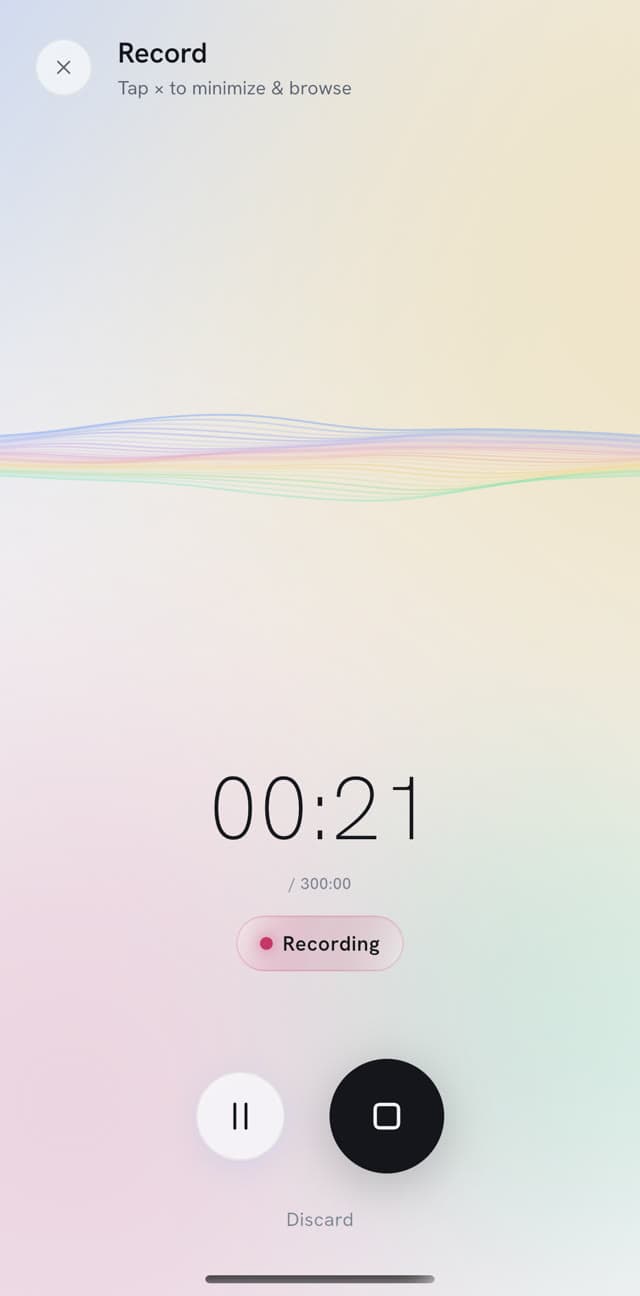
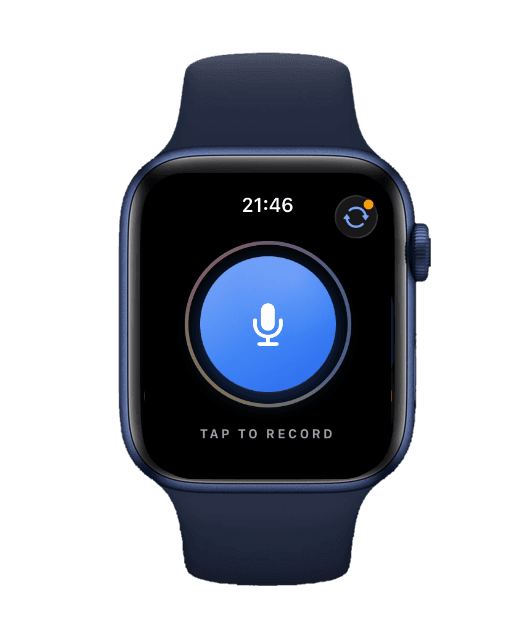
Lay your iPhone on the pew or the pulpit and lock it: the app keeps recording. Read the sermon back during the week.
- Apple Watch. Start recording on your wrist, with no phone nearby.
- Pause for the songs, then resume for the sermon.
- Trim it in the app before you transcribe.

Everything else you can do with a sermon
Get the sermon in, work in the transcript, then pass it on.
Get the sermon in
- LinksA recorded stream's YouTube, Facebook or Vimeo link, one video per link.
- Browser recorderRecords your laptop's microphone with the tab open.
- Video of the serviceUpload the video, or just its audio to keep the file small.
- Noise removalClean up a sermon recorded in a noisy hall.
Work in the transcript
- Speaker namesUp to 32 voices, each with its own label.
- Verbatim or cleanKeep every word as preached, or leave out ums and repeats with No verbatim.
- AskAsk what was said about forgiveness and jump to the moment.
- Notes and bookmarksMark a line for the bulletin.
For the groups
- Quiz and study cardsFrom the sermon, for a youth group or a class.
- DraftsA first draft of a blog post or a newsletter email.
- Share by linkSend a group the transcript or summary by a link that expires.
The sermon in the language your members read
Translate the transcript and read both side by side, with the speaker and time on every line.
- Detection
- 99+ languages, automatic
- Translation
- TXT, SRT or VTT to download
Read about multilingual transcription and how to translate audio.
El samaritano es la última persona que aquella gente esperaba ver detenerse. Cruza el camino y se queda hasta que el hombre está a salvo.
Así que la pregunta se da la vuelta. ¿De quién fui yo prójimo esta semana, y junto a quién pasé sin detenerme?
Plans and prices
Free is a plan you can stay on, with no card. Pay monthly, or pay for the year and save up to 70%.
One 40-minute sermon a week is about 3 hr a month, which fits Starter.
30 min a month, files up to 15 min
- Monthly
- $0
- Yearly
- $0
5 hr a month, files up to 5 hr
- Monthly
- $7 a month
- Yearly
- $2.60 a month, Save 63%
Regular price $84$31.20 for the first year. Renews at $52/year.
20 hr a month, files up to 5 hr
- Monthly
- $20 a month
- Yearly
- $6 a month, Save 70%
Regular price $240$72 for the first year. Renews at $120/year.
40 hr a month, files up to 8 hr 20 min
- Monthly
- $40 a month
- Yearly
- $12 a month, Save 70%
Regular price $480$144 for the first year. Renews at $240/year.
Good to know
- Custom vocabulary, the ready-made list, background noise removal and drafts need a paid plan.
- Free transcribes the first 15 min of each file, 15 min a day, and the browser and iPhone recorders stop at 15 min.
- Background noise removal takes files up to 60 min and 500 MB, and counts as 2× the minutes.
- A video of a whole service can be too large: upload its audio instead.
- PrismaScribe doesn't look up Bible references. Check quoted verses against your Bible before you publish.
- A translation uses the transcript as it is when you translate, so fix names first.
Your sermons stay private
- Encrypted in transit and at rest, and visible only to you and the people you share them with.
- Never used to train AI models. Your recordings and transcripts stay yours.
- Kept until you delete them. Deleting a recording deletes its transcript from our storage too.
Sermon transcription FAQ
More questions? Write to hello@prismascribe.ai.
How do I transcribe a sermon?
Upload the recording, record it on your iPhone, or paste the stream's link once it has ended. Say how many people speak, and keep every word or switch on No verbatim. It's usually ready a few minutes after you upload, and we email you. No person reviews it, so check names before you publish.
Can I transcribe only the sermon from a whole service?
Yes, from a link. Paste the service's YouTube, Facebook or Vimeo link and set a start and end time around the sermon. Only those minutes are transcribed and counted, so the songs stay out. For a file, upload the sermon on its own.
How do I get names and Bible references right?
Add the names first and check the references after. Before you transcribe, add the names and terms the sermon uses; for English audio there's also a ready-made list of biblical names, books and theological terms. PrismaScribe doesn't look up references, so find each one, click to listen and fix it in place.
Can I put the captions on our YouTube video?
Yes. Download SRT or VTT captions and upload them with the video in YouTube Studio, which takes both (checked 12 October 2026). Set the line and caption length first, with speaker names on or off. Fix names before you export, since the captions use your edits.
Does it work with a recording from a hall with echo?
Yes, though echo, music and a distant microphone can lower accuracy. If the hall is also noisy, switch on background noise removal before you transcribe, for a sermon of up to 60 min. Then click any word you doubt to hear it.
Can it caption our service live?
No. PrismaScribe transcribes a recording after the service, from a file or from the link once the stream has ended; a stream that is still live is refused. For words on a screen in the hall, you need a live captioning tool or a captioner. Afterwards, captions help members who can't hear well.
Can members read the sermon in another language?
Yes. Translate the transcript into 99+ languages and read it beside the original, with the speaker and time on every line. Share the translation by link, or download TXT, SRT or VTT for translated captions. Fix names first: later edits don't reach a translation.
Can I make a summary or questions for a small group?
Yes. A summary, a quiz or study cards are on every plan, and each uses one of your monthly generations. Make a summary with a time on every key point, a quiz of 5 to 20 questions with explanations, or study cards. You take the quiz in the iPhone app; the web shows the answer key. There's no devotional generator.
Can a chat assistant or my phone's live captions transcribe a sermon?
Partly. One popular chat assistant takes audio files up to 512 MB, but not on its free plan, and its help center warns that very long recordings may time out and speaker identification may be unreliable. The live captions app we checked writes down speech from the microphone (both checked 12 October 2026). PrismaScribe opens a recording or a link and labels every voice.
Can I transcribe a sermon for free?
Only part of one. Free transcribes the first 15 min of each file, 15 min a day and 30 min a month, with no card. On the web a longer upload becomes a preview, which in a whole service may be the songs. Top-up hours, which never expire, transcribe the rest. For a sermon every week, a paid plan adds new hours each month.
How much does it cost to transcribe a sermon every week?
A paid plan starts with Starter at $7 a month for 5 hr, which covers one 40-minute sermon a week, about 3 hr a month. A 90-minute service every week fits Premium: $20 for 20 hr. Custom vocabulary and noise removal use more. Top-up hours never expire. Compare plans.
Who can see our recordings?
Only you and the people you share them with. Recordings and transcripts are encrypted in transit and at rest, never used to train AI models, and kept until you delete them. A share link shows the text without the audio. Ask a guest speaker before you publish their words.
Transcribe your next sermon.
Free transcribes the first 15 min of each file, 30 min a month, no card.

One recording in.
Everything you need out.