
Podcast sponsorship reporting: verify ad reads with a transcript
Search the transcript for the sponsor's name, promo code and talking points, note when the read ran, and quote exactly what the host said.

Armin
Published 8 min read

Key takeaways
- Turn the sponsor's brief into a checklist: name, talking points, code or URL, disclosure, placement.
- Find in transcript jumps to every matching paragraph, and each paragraph shows its timestamp.
- Search for codes and URLs the way they're written, because that's how the transcript spells them.
- Read the paragraphs around each hit: a co-host's "their dark roast" won't match the brand name.
- Downloads and listener data come from your hosting platform, not from the transcript.
A sponsor emails to ask whether last week's ad read covered the brief, and roughly when it ran. Audio is a poor format for proof, while a transcript turns every episode into text you can search. This guide covers podcast sponsorship reporting from the transcript: a checklist from the brief, a search for each item, the timestamp of the read, and a filled-in sample report from a real test.
What a sponsor wants to know about a read
The brief or insertion order (the sponsor's booking document) says what they expect. Most of it comes down to four questions you can check: was the brand name said correctly, were the agreed talking points covered, was the promo code or URL stated clearly, and did the read run where it was supposed to? Some sponsors also ask about what surrounds the read, such as a competitor mentioned in the same episode. Audio can answer all of that, but only if someone listens again, which is slow.
Verify an ad read on the web
Turn the brief into a short checklist first: the brand name as specified, each required talking point, the promo code, URL or call to action, any required disclosure wording, and the placement (pre-roll, mid-roll or post-roll). Then:
- Add the sponsor's terms before you upload. Type the brand name, product name and promo code in the Keyterms field, right under Audio Language in the upload dialog. Keyterms are custom vocabulary and count as 1.25 times the file's minutes. The field remembers your last list in that browser, so last month's sponsor stays in it, and costs extra, until you clear it. Save current list keeps one list per sponsor under My lists.
- Rename the speakers. Recognize Speakers is on by default, so voices arrive as Speaker 1 and Speaker 2. Click a name and use Rename speaker to label them Host and Co-host, so the report credits the right voice.
- Search each checklist item. Type it into Find in transcript: it highlights every match, dims the paragraphs without one, and the up and down arrows step through the matching paragraphs.
- Read the paragraphs around each hit. A co-host who says "their coffee" mentions the sponsor without matching its name.
- Note the timing. Each paragraph shows its timestamp. Clicking a word moves the player to that exact moment, so you can find where the read starts and ends and listen to it.
- Listen for what text can't show: how the brand was pronounced and how the read sounded. A flat, rushed read can look perfect on the page.
If you want the times on paper, export TXT, DOCX, Markdown or PDF: Include timestamps is on by default for all four. Skip SRT and VTT, the caption formats, which cut a read into short on-screen chunks that are harder to quote.
A worked example: one ad read, checked
To test this, we made a 36-second segment of an invented show, Side Project Hours, with two computer voices: the host reads a mid-roll for an invented sponsor, Fernwood Coffee, with the promo code FERN20. We uploaded it with Recognize Speakers on and no Keyterms. The transcript was ready about 13 seconds after we clicked Transcribe and used one minute of the allowance, since each file rounds up to a whole minute. Both voices came back as separate speakers and every word matched what was said, which is the best case: clean audio, no music bed, read from a script.
Searching "Fernwood" showed a counter of 1/2: two paragraphs matched, holding three highlighted hits, "Fernwood" twice and "fernwoodcoffee.com" once, because the search also matches inside longer words. The read starts in the host's paragraph at 0:13 and runs into the next one at 0:23. Clicking the first "Fernwood" moved the player to 0:17. A search for "FERN20" found the paragraph at 0:23.
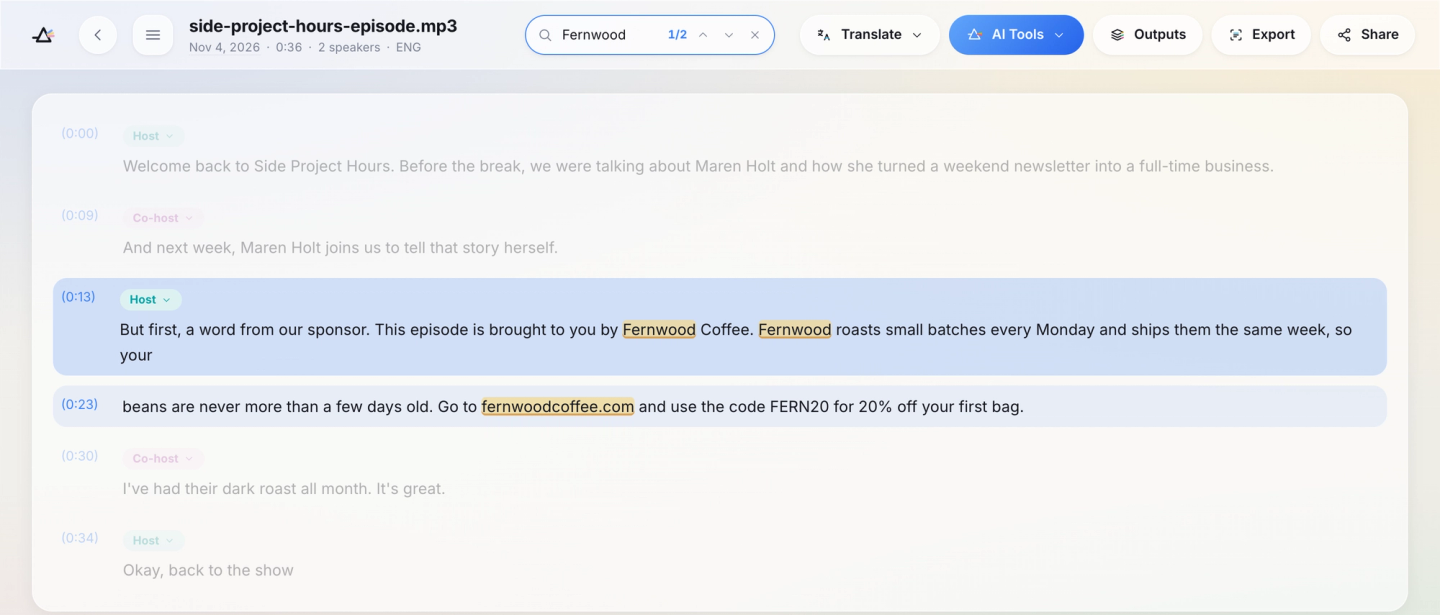
The read as transcribed, from the host's paragraphs at 0:13 and 0:23:
This episode is brought to you by Fernwood Coffee. Fernwood roasts small batches every Monday and ships them the same week, so your beans are never more than a few days old. Go to fernwoodcoffee.com and use the code FERN20 for 20% off your first bag.
The transcript wrote down what it heard in written form: the spoken "fernwood coffee dot com" came back as "fernwoodcoffee.com", "fern twenty" as "FERN20" and "twenty percent" as a figure. So search for codes and URLs the way the brief writes them, not the way they're said. The brand name came through without Keyterms here, but an unusual name can go wrong: in another of our test calls, the company name Copperleaf came back as "Copyleft".
Then the paragraph right after the read, from the co-host at 0:30: "I've had their dark roast all month. It's great." That's a second, personal endorsement of the sponsor, and a search for "Fernwood" never finds it.
Paste a link, get a searchable transcript
Free plan includes 30 minutes of transcription every month. No credit card.
A podcast sponsorship reporting template
Here is the report for the test segment, filled in. Use the same lines for each episode:
- Episode: Side Project Hours, test segment. Title and publish date from your hosting platform.
- Placement: mid-roll, between "Before the break" and "back to the show", from 0:13 to about 0:30, across the host's paragraphs at 0:13 and 0:23.
- Brand name: Fernwood Coffee, said twice.
- URL and code: fernwoodcoffee.com and FERN20, both present.
- Talking points: small batches roasted every Monday, shipped the same week, beans never more than a few days old.
- Disclosure: "This episode is brought to you by". Compare it with the wording your sponsor requires.
- Quote: the full read, as transcribed above.
- Other sponsor mentions: co-host at 0:30, "I've had their dark roast all month. It's great."
- Competitor mentions: none; no other coffee brand comes up.
- Downloads and listener data: from your hosting platform or the sponsor's own tracking.
The transcript covers what was said; downloads, listener geography and conversions come from your host or the sponsor. Timestamps are useful well beyond sponsor checks, and our piece on what podcast timestamps make possible covers the other uses. Our podcast transcription page covers the rest of the setup.
Find brand and competitor mentions
Search for the sponsor's name, the product name and any shorthand the host uses, plus likely misspellings. If your agreement includes category exclusivity, a promise not to promote rival brands, search for competitors too. A mention isn't automatically an endorsement: "I tried their app once and hated it" is not a recommendation, so read the context before you flag anything.
Whether to publish the transcript
A public transcript helps search and accessibility, and our guide to choosing verbatim or clean text covers tidying one before you post it. The practical risk is your ad reads living on in writing: a promo code that expires next month stays on the page, so check your sponsorship agreement and plan to update the text. The report itself doesn't need a public transcript.
Budget the minutes
Each episode uses its length in transcription minutes, rounded up to a whole minute, and Keyterms, which are on paid plans, add a quarter on top:
- Free: 30 minutes a month, 15 a day and 15 per file, with no Keyterms, so it suits a short segment rather than a full episode.
- Starter: 5 hours a month. Four 60-minute episodes with Keyterms count as 4 × 60 × 1.25 = 300 minutes, which is the whole month.
- Premium: 20 hours, room for a weekly show with Keyterms and some back episodes besides.
Top-up hours never expire, so they can cover a busy month. Current limits are on the pricing page.
Build the check into your release routine
The best time to check a read is before the episode goes out, when a wrong code can still be re-recorded:
- Upload the final edit with the current sponsor's terms in Keyterms.
- When the transcript is ready, work through the checklist and read around each hit.
- Fix anything wrong in the audio before release.
- Save the filled-in report for the episode.
- Rename the file with the episode number and the sponsor, since the library search matches file names, not the words inside.
When the sponsor asks, the answer is already written.
Frequently asked questions
Can you search across episodes?
The library search box matches file names only, so put the episode number and the sponsor in each file name to find episodes by sponsor. To search the words of many episodes at once, export each transcript as TXT on the web into one folder and run your computer's file search on that folder.
Does this work with dynamically inserted ads?
Only if the read is in the file you transcribe. Ads your hosting platform inserts at download time aren't in your edited episode. To check them, download the published episode from your feed the way a listener would and upload that file: it holds the ads served to that one download, which may differ for other listeners.
What if the read went out with the wrong promo code?
The transcript shows it: search for the code you briefed and for what was said instead. Tell the sponsor before they notice a gap in redemptions, send the line with its timestamp, and agree on a fix, such as a corrected read in the next episode. Checking the final edit before release avoids this.
How soon can you check an ad read?
As soon as the final audio exists. About an hour of audio takes about 2 minutes, you can close the page while it runs, and you get an email when it's ready, so a check fits between the final edit and publishing.


Turn hours of audio into searchable text
Upload a file or paste a link. Speaker labels, translations, and six export formats included.