
Verbatim Or Clean? How To Edit A Podcast Transcript Before You Publish It
A podcast transcript can be accurate and still be difficult to read. Spoken language includes filler words, false starts, repetitions, and loose sentence structures that do not always work well on a webpage. The editing process should make the transcript easier to read without changing what the speaker meant. This workflow covers how to choose between clean and verbatim transcription, check speaker labels, verify names, numbers, terms, and quotes, break long conversations into readable sections, and add headings without over-editing the conversation. It also covers export formats and a practical review process for turning a transcript from a podcast transcription service into a publishable resource.

Armin
Published 6 min read

Key takeaways
- Choose clean transcription for readability and verbatim transcription when an exact record matters.
- Check guest names, numbers, brand terms, dates, and quotes against the original audio.
- Remove filler and repetition without changing the speaker's meaning or intent.
- Use headings, shorter paragraphs, and consistent speaker labels to make transcripts easier to scan.
- 1. Keep the original verbatim transcript as a reference when publishing a cleaned-up version.
To edit a podcast transcript, choose verbatim or clean-up first, then check names, numbers and quotes against the audio, remove only what doesn't change the meaning, and read it once aloud before you publish. A podcast transcription service gives you the draft. Editing decides whether the published version reads well and stays true to what was said.
People speak differently from how they write, so a raw podcast transcript can look messy even when every word is right. This guide covers the choice between verbatim and clean, the edits worth making and the ones to avoid.
What is the difference between a verbatim and a clean podcast transcript?
A verbatim podcast transcript keeps every word, including filler, false starts and repeats. A clean one removes filler words and false starts so it reads more like written text. Neither is the "correct" version. The right choice depends on what the transcript is for.
PrismaScribe offers both modes: clean-up, which removes filler words and false starts automatically, and verbatim, which keeps every word. You choose before you upload, so the decision saves you editing time later.
Which should you choose for your podcast transcript?
Choose clean for readers and verbatim for records. If people will read the transcript on your site, clean-up is usually the better fit. If you need an exact record, such as for research, legal reference or a documentary, verbatim is safer.
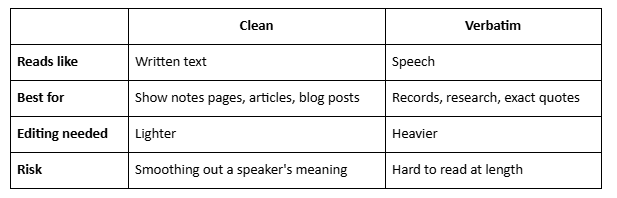
If you can't decide, keep the verbatim file as your source and publish the clean one.
How do you edit a podcast transcript step by step?
Work in passes, and finish one before you start the next. Fixing everything at once is how errors slip through.
- Read it once without editing, to see what the podcast transcript looks like as a whole.
- Check speaker labels. PrismaScribe can label up to 32 speakers, so a panel or a guest episode stays readable. Rename the labels to real names.
- Fix names, numbers and terms against the audio (details below).
- Split long turns into shorter paragraphs where the idea changes.
- Add structure with headings at topic changes, so readers can scan.
- Read it aloud once, which is the fastest way to catch awkward lines.
What should you check first in a podcast transcript?
Check names, numbers and specialist terms first, because that's where transcripts most often need fixing. PrismaScribe reaches 99% accuracy on clean audio. The errors that remain tend to be guest names, product names, brand terms and figures.
- Guest names and titles. Confirm spellings with the guest or their own website.
- Numbers and dates. Replay the audio for every figure you plan to publish.
- Brand and product names. Check capitalization and spelling.
- Quotes. Make sure any line you pull out matches the audio exactly.
Paste a link, get a searchable transcript
Free plan includes 30 minutes of transcription every month. No credit card.
On paid plans, custom vocabulary lets you add names, jargon and acronyms before you upload, which cuts down these corrections. If the recording has noise problems, see tips for accurate voice-to-text transcription with noisy audio, and use background-noise removal on paid plans.
What can you safely remove from a podcast transcript?
Remove what doesn't change the meaning: filler words, false starts, repeated words and housekeeping such as "can you hear me?". If you choose to clean-up, much of this is already gone. Whatever remains, cut it lightly.
What should you leave alone in a podcast transcript?
Leave anything that changes what the speaker meant. Editing a podcast transcript isn't rewriting the conversation.
- Don't change a speaker's words to make them sound smarter or more polished.
- Don't cut hedges and qualifiers ("I think", "in my experience") if they affect the claim.
- Don't fix a factual mistake silently. If a guest misstates something, add a short editor's note or correct it in the show notes, and consider asking the guest first.
- Don't merge two speakers' points into one voice.
- Keep laughter or pauses when they change how a line should be read, such as a joke or sarcasm.
If your podcast transcript is a public record of what a guest said, accuracy matters more than polish.
How do you make a podcast transcript easy to read on a page?
Add structure, because a wall of text is hard to scan. Breaking it up makes a long episode usable.
- Add headings at topic changes, using short, descriptive titles.
- Use one consistent speaker style, such as the name in bold followed by a colon.
- Add a summary at the top. AI summaries are on every plan (3 AI generations a month on the free plan), so you can generate a first draft
- Link to the episode and to related episodes, so readers move on from the transcript.
For ideas on using time markers in a transcript, see the timestamp is the most underused feature in podcasting.
Which export format should you use for a podcast transcript?
DOCX is best for editing, Markdown suits publishing tools and TXT works for pasting anywhere. PDF is a read-only copy for sharing, and SRT and VTT are caption formats for subtitles and players. PrismaScribe exports all six: TXT, SRT, VTT, PDF, DOCX and Markdown.
If you're adding subtitles to an audio-only episode, why podcasters are adding subtitles to audio-only episodes explains the reasons. PrismaScribe's SRT and VTT exports also let you set characters per line and caption duration.
How long does it take to edit a podcast transcript?
It depends on the episode's audio and your standard. Transcribing takes minutes: about an hour of audio takes about 2 minutes. It's fast, but asynchronous. The editing is where your time goes, and clean audio with one voice at a time keeps it shorter. Timing yourself on one episode gives you a realistic estimate for the rest.
The free plan includes 30 minutes of transcription a month, with files up to 15 minutes, so it works for testing a short clip. Paid plans are $7, $20 and $40 a month, or less if billed annually, and they allow much longer files.
What should you do next?
Take your latest episode, choose verbatim or clean, and run the six steps above on one podcast transcript. Keep a short checklist of the corrections you made most, so the next edit goes faster. If you're deciding what else to do with your archive, why your podcast's most valuable content is buried in episode 12 shows how a transcript helps you find it.
Frequently asked questions
How do I edit a podcast transcript?
Choose verbatim or clean-up, check speaker labels, fix names, numbers and terms against the audio, split long turns into paragraphs, add headings, then read it aloud once before you publish.
Can a podcast transcription service create both clean and verbatim versions?
PrismaScribe offers both modes: clean-up removes filler words and false starts, and verbatim keeps every word. You choose before you upload, so to get both versions you transcribe the file twice, which uses the minutes twice
Should I publish the full transcript of my podcast?
It's a choice. Many hosts publish a cleaned transcript with the episode, or a summary with the transcript linked. Proofread whichever version you publish, and confirm with guests if you're unsure.
Does PrismaScribe label the speakers?
Yes, up to 32. Rename the labels to real names before you export so the transcript is clear to readers.
Which format should I export a podcast transcript in?
Use DOCX for editing, Markdown for publishing tools, TXT for plain text and PDF for a read-only copy. SRT and VTT are for subtitles and players.


Turn hours of audio into searchable text
Upload a file or paste a link. Speaker labels, translations, and six export formats included.