
How to properly transcribe an interview, step by step
What a proper interview transcript contains, how to lay it out, and the steps from recording to a checked file, by hand or with a transcription service.

Armin
Published 10 min read

Key takeaways
- A proper interview transcript has a header, a label on every turn, timestamps and one style used from the first line to the last.
- Choose verbatim or clean before you start. Verbatim keeps fillers and false starts, clean removes them and keeps the meaning.
- Mark what you can't hear with a tag and a timestamp, such as [inaudible 12:41], and never guess a word.
- Typing by hand takes several hours for each hour of audio. A transcription service gives you a draft in minutes, and your time goes into checking it.
- Check names, numbers and every quote you plan to use against the recording before anyone else sees the file.
Knowing how to properly transcribe an interview comes down to a few decisions made before you type the first word, and one careful check at the end. This guide covers what a proper transcript contains, the layout readers expect, and the steps for doing it by hand or with a transcription service. The examples come from a short interview we staged and ran through PrismaScribe, so you can see real output and not a tidy template.
What a proper interview transcript contains
Someone who wasn't in the room should be able to read the transcript, tell who said what, and find any sentence in the recording. That takes five things:
- A header. The name of the interview or file, the date, the length of the recording and who took part (names or codes).
- A label on every turn. The speaker's name, role or code starts each turn, and a new paragraph begins whenever the speaker changes.
- Timestamps. One at the start of each turn is enough for most work. It lets a reader go from a quote back to the audio.
- One style throughout. Either verbatim or clean (next section), with the same rules for numbers, fillers and unclear words on every page.
- Tags for what isn't speech. Laughter, a long pause, a phone ringing or a word nobody could make out, each in square brackets.
Choose verbatim or clean before you start
Guides to interview transcription usually name three styles. Verbatim keeps every word as spoken, with fillers, repeats and false starts. Intelligent verbatim, often called clean verbatim, drops those and keeps the meaning and the speaker's own wording. An edited transcript goes further and fixes grammar, which makes it a rewrite, so it's rarely what "properly" means.
The right style depends on what the transcript is for. Legal work, language research and anything where hesitation matters need verbatim. Articles, hiring notes, podcasts and most research that looks for themes read better clean.
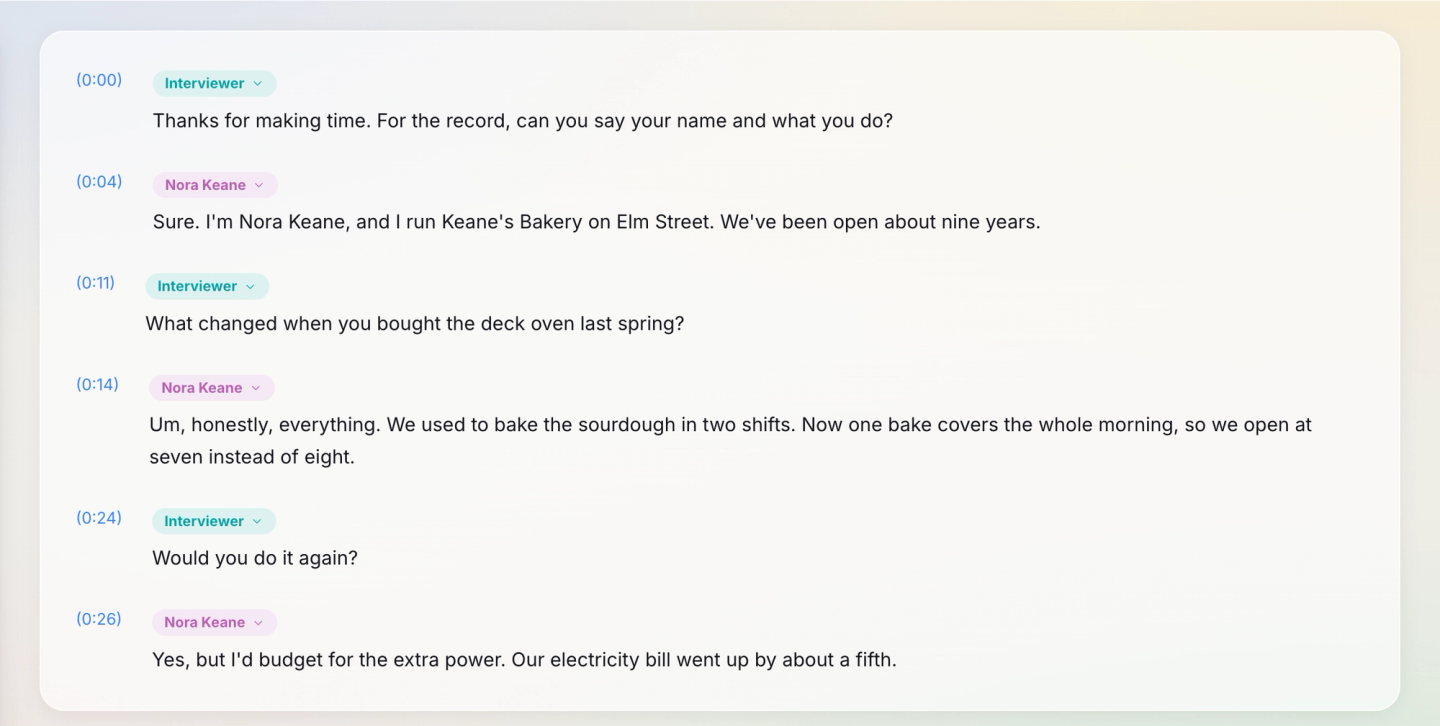
Here is one answer from our staged interview in both styles, exactly as each run came back:
- Verbatim: "Um, honestly, everything. We used to bake the sourdough in two shifts. Now one bake covers the whole morning, so we open at seven instead of eight."
- Clean: "Honestly, everything. We used to bake the sourdough in two shifts. Now one bake covers the whole morning, so we open at 7:00 instead of 8:00."
The clean run dropped the "um", and it also turned "seven instead of eight" into "7:00 instead of 8:00". Small things like that are why you pick one style and write it down. A transcript that switches between them halfway reads as rushed.
Lay out the interview transcript so anyone can follow it
There is no single official format, but the layouts people accept share the same parts. These are the header lines of the plain-text file PrismaScribe exported for our interview:
- bakery-owner-interview.mp3
- Language: ENG
- Duration: 32s
- Transcribed: November 12, 2026
- Speaker detection: Enabled
Below the header, each speaker's name sits on its own line and the turn follows with a timestamp in front. Shortened to one line each, the first three turns read:
- Interviewer [0:00] Thanks for making time. For the record, can you say your name and what you do?
- Nora Keane [0:04] Sure. I'm Nora Keane, and I run Keane's Bakery on Elm Street. We've been open about nine years.
- Interviewer [0:11] What changed when you bought the deck oven last spring?
Whatever tool you use, keep to these conventions:
- Label speakers the same way on every page. Use full names for a published interview, roles (Interviewer, Candidate) for hiring, and codes like P07 where people were promised anonymity.
- Start a new paragraph at every change of speaker, even for a one-word answer.
- Put tags in square brackets. [laughs], [pause], [crosstalk] when two people talk at once, and [inaudible 12:41] with the time when you can't make out a word.
- Never guess. If you're fairly sure of a word but not certain, write it with a question mark in brackets, like [Brookfield?], and check it later.
- Settle numbers once. Digits or words, and the same choice in every interview of a project.
Paste a link, get a searchable transcript
Free plan includes 30 minutes of transcription every month. No credit card.
Record the interview so it transcribes well
Audio quality decides most of what happens later, for a person typing and for software alike.
- Record in a quiet room and put the phone or recorder closer to the interviewee than to you.
- For a call, record with headsets on both sides where you can. If the interview is on Zoom, Google Meet or Teams, a meeting bot on the paid plans can join from the link and transcribe it, as in our guide on how to transcribe a Zoom meeting.
- Ask everyone to say their name at the start. It makes labelling the speakers easy.
- Say on the recording that you're recording and that the other person agrees. It settles the question later.
- Don't talk over answers. Nod where you'd normally say "right" or "mm-hm".
If the interview is for a study, our guide to qualitative research transcription covers participant codes and anonymising the file.
How to properly transcribe an interview by hand
Typing it yourself costs nothing and teaches you the material. It is slow: expect several hours of work for each hour of recording, more when people talk over each other. If you go this way, work in passes.
- Listen once without typing. You'll learn the voices, the names and where the hard passages are.
- Set up the page first. Write the header, decide the speaker labels and the style, and note them at the top.
- Type a rough draft at reduced speed. Most audio players can slow playback. Keep going past words you miss and leave an [inaudible] tag with the time.
- Add a timestamp at each change of speaker, or at least every minute or so in long answers.
- Go back to the tagged passages with headphones and fill in what you can.
- Read the whole transcript against the audio at normal speed, start to finish.
For one short interview this works well. For a project with ten of them, the typing eats the hours you wanted for the analysis or the article.
Use a transcription service, then check the draft
A transcription service does the typing, the speaker labels and the timestamps. The job that's left is the one that makes a transcript proper: checking it. These are the steps in PrismaScribe on the web, with the settings we used for the staged interview, a 32-second MP3 with two computer-generated voices, run on a free account.
- Choose Transcribe Files and add the recording. Audio and video files both work.
- Leave Audio Language on "Detect automatically".
- Open Advanced Settings. Keep Recognize Speakers on and type the number of people under How many speakers? We entered 2. Left empty, the count is detected for you, up to 32 speakers.
- Tag audio events is on by default and marks laughter or applause. Untick it if those tags would only get in the way.
- Tick No verbatim for a clean transcript, or leave it off for verbatim. Clean-up isn't offered for every language, and each run uses the file's minutes, so choose once.
- Start the transcription. Our file came back in under 20 seconds. About an hour of audio takes about 2 minutes, and you can close the page and come back when it's ready.
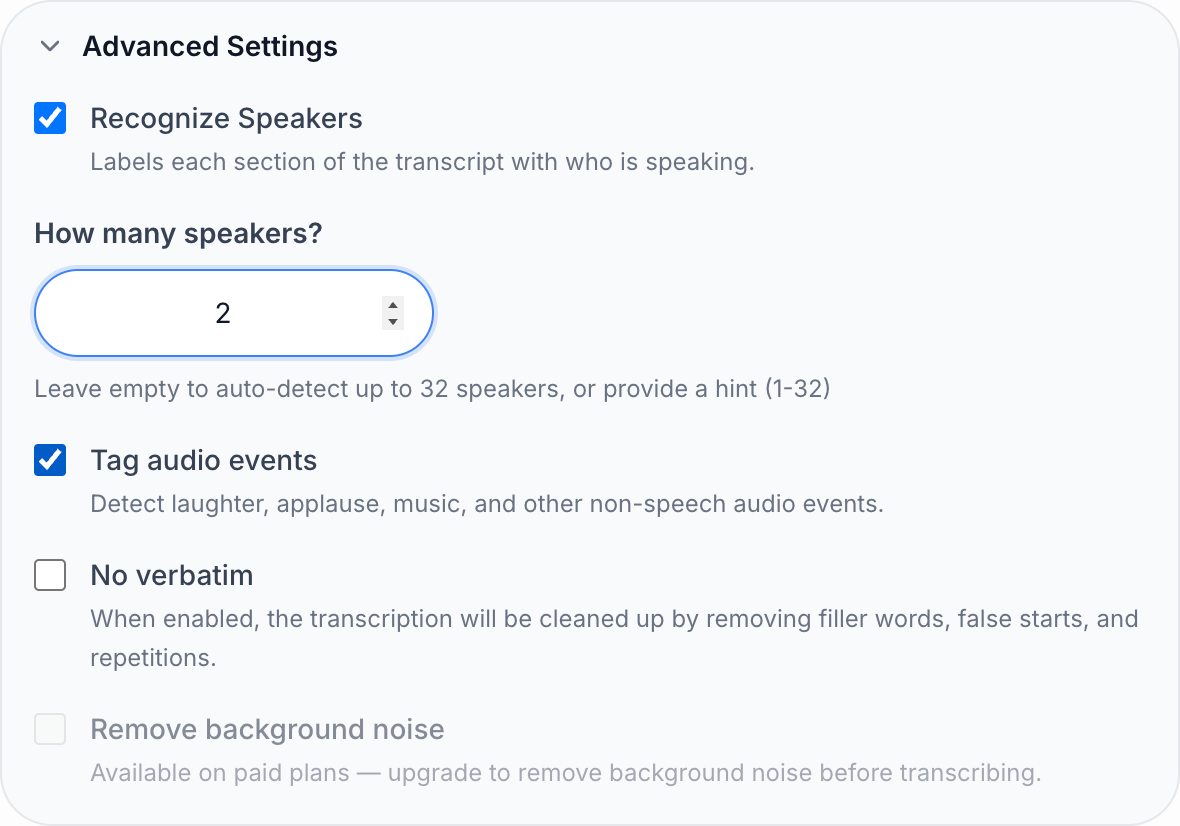
Speakers arrive as Speaker 1 and Speaker 2. Open a speaker label, choose the pencil, type the name or code and choose All paragraphs. We renamed ours to Interviewer and Nora Keane, and the names carried into every export.
The draft wasn't perfect. The surname came back the way it sounds, "Keen" instead of "Keane", in both places it was said:

Clicking into the line and retyping the two words fixed it. The editor saves as you type, and the TXT export we made afterwards read "Nora Keane" and "Keane's Bakery". Every other word matched the recording, the "um" and the numbers included. A misheard surname is the case a custom term list is for. On paid plans you can list names like Keane before transcribing, counted as 1.25× the file's minutes. For a noisy recording, noise removal cleans up the audio first, counted as 2× and available for files up to 60 minutes.
When the text is right, choose Export, pick a format and keep Include speaker names and Include timestamps on. DOCX and PDF suit a file you'll send to someone, TXT and Markdown suit notes, and SRT or VTT are for subtitles if the interview is a video. Our interview transcription page shows more of what the transcript page can do.
Check the transcript against the recording
PrismaScribe's accuracy on clean audio is 99%, which in an hour-long interview still leaves words to fix. An unchecked transcript isn't finished, however it was made. Check these, in this order:
- Names. People, companies, places and products. Search for each one so every spelling matches.
- Numbers. Dates, amounts and percentages. Readers repeat figures, so a wrong one travels.
- Every quote you plan to use. Click the word or the timestamp so the player jumps to that moment, and listen while you read.
- Speaker labels around interruptions. Where two people overlap, a turn can land under the wrong name.
- Your tags. Resolve each [inaudible] and bracketed guess, or leave it marked. A marked gap is honest. A guess isn't.
Our post on how to proofread a transcript turns this into a two-pass routine.
Plans and minutes for interviews
PrismaScribe's Free plan includes 30 minutes of transcription a month, with files up to 15 minutes each and 15 minutes a day. That covers a short interview or a test of your settings. A one-hour interview needs a paid plan or top-up hours. Starter is $7 a month for 5 hours, with files up to 5 hours long, and it costs less if billed annually. Top-up hours don't expire and also lift the Free plan's 15-minute file limit, which suits a handful of interviews a year. Current prices are on the pricing page.
Learning how to properly transcribe an interview is mostly learning to be consistent. Pick the style, the labels and the way you mark doubt before you start, and keep to them on every page. Then check the file against the audio before it leaves your hands, because that check is what lets a reader trust the quotes.
Frequently asked questions
How long does it take to transcribe a one-hour interview?
By hand, plan on several hours, and longer if the audio is noisy or people interrupt each other. With PrismaScribe, about an hour of audio takes about 2 minutes to transcribe. Add the time to check names, numbers and quotes against the recording.
Should I include "um" and "uh" in an interview transcript?
Only if the transcript is verbatim. Keep fillers when hesitation is part of what you're studying or when the record must show exactly what was said. For articles, hiring notes and most reports, a clean transcript without fillers is easier to read and just as faithful to the meaning.
How do I transcribe an interview held on Zoom or by phone?
Record the call and upload the file, or on a paid plan paste the Zoom, Google Meet or Microsoft Teams link and let the meeting bot join and transcribe it. For a phone call, put the phone on speaker next to a recorder or use your phone's own call recording where it's available, and tell the other person first.
Should I fix the speaker's grammar in a transcript?
No. A transcript records what was said, so leave the wording alone even in a clean version, which drops fillers and false starts and may write spoken numbers as digits. If you tidy a quote for publication, do that in the article and follow your publication's rules for marking the change.
Can I transcribe an interview for free?
Yes, in two ways. Typing it yourself costs only time. PrismaScribe's Free plan includes 30 minutes a month with files up to 15 minutes each, with speaker labels and all six export formats, so a short interview fits.


Turn hours of audio into searchable text
Upload a file or paste a link. Speaker labels, translations, and six export formats included.