
Qualitative research transcription, shown on a real interview
How to turn research interviews into transcripts you can code, with every step shown on a real file, from upload to an anonymised Word document.

Armin
Published 8 min read

Key takeaways
- Decide verbatim or clean before you upload. The two versions differ in fillers, false starts and how numbers are written.
- Give each participant a code like P07 in the transcript, and keep real names out of it.
- Export to Word with speaker names and timestamps on, so every quote can be traced back to the audio.
- Anonymise in the exported file with find and replace, using one key file kept apart from the data.
Qualitative research transcription is the step between a recorded interview and the coding you actually care about. This guide walks through it on a real file: a short interview we staged with two synthetic voices, a researcher and a first-year teacher, and ran through PrismaScribe on a free account. You'll see the settings we chose, what came back, what we fixed and the Word file we ended up with.
Decide verbatim or clean before you transcribe
Most guides list three styles: strict verbatim, intelligent (or clean) verbatim, and edited. In practice you choose between two. Verbatim keeps every filler, repeat and false start. Clean removes them and keeps the meaning.
The choice belongs to your method, not your patience. Discourse and conversation analysis need verbatim, because hesitation and repair are data. Thematic analysis usually works from clean text, because "um, so I, I" adds nothing to a theme and slows coding down.
We ran the same 42-second interview both ways. Here is one answer from the participant, word for word as each version came back:
- Verbatim: "Um, so I, I start on Sunday evening. I take the unit plan from my mentor, Maria Lopez, and I, you know, break it into five lessons."
- Clean: "So I start on Sunday evening. I take the unit plan from my mentor, Maria Lopez, and I break it into five lessons."
One difference is easy to miss. The verbatim version wrote "twenty-eight students" and the clean one wrote "28 students". If you count or quote figures, decide which form your codebook expects. Each run is a separate transcription and uses the file's minutes again, so pick one style up front instead of running both.
What a transcript won't mark for you
Verbatim gives you every word, not every sound. The transcript doesn't time pauses, mark where two people overlap or show intonation, and audio-event tags cover only things like laughter and applause. If you use conversation analysis or another method with its own transcription conventions (Jefferson notation, for example), treat the transcript as the first layer: the words and who said them, with timestamps. Then add pauses, overlaps and emphasis by hand while you listen to the passages you analyse. For thematic work, the words, speakers and timestamps are usually all a qualitative research transcription needs.
Set up the upload for interviews and focus groups
On the web, choose Transcribe Files, add the recording and open Advanced Settings. These are the options that matter for research recordings:
- Recognize Speakers. Leave it on. It labels each turn with who is speaking.
- How many speakers? Type the number you expect. We entered 2. For a focus group, enter the number of people in the room (up to 32). Leave it empty and the count is detected for you.
- Tag audio events. Laughter, applause and music show up as tags in the text. In a focus group, laughter after a remark is often worth coding.
- No verbatim. Tick it for the clean version and leave it off for verbatim. Clean-up isn't offered for every language.
- Audio Language. "Detect automatically" works for most interviews, including ones where people switch languages mid-answer.
Paste a link, get a searchable transcript
Free plan includes 30 minutes of transcription every month. No credit card.
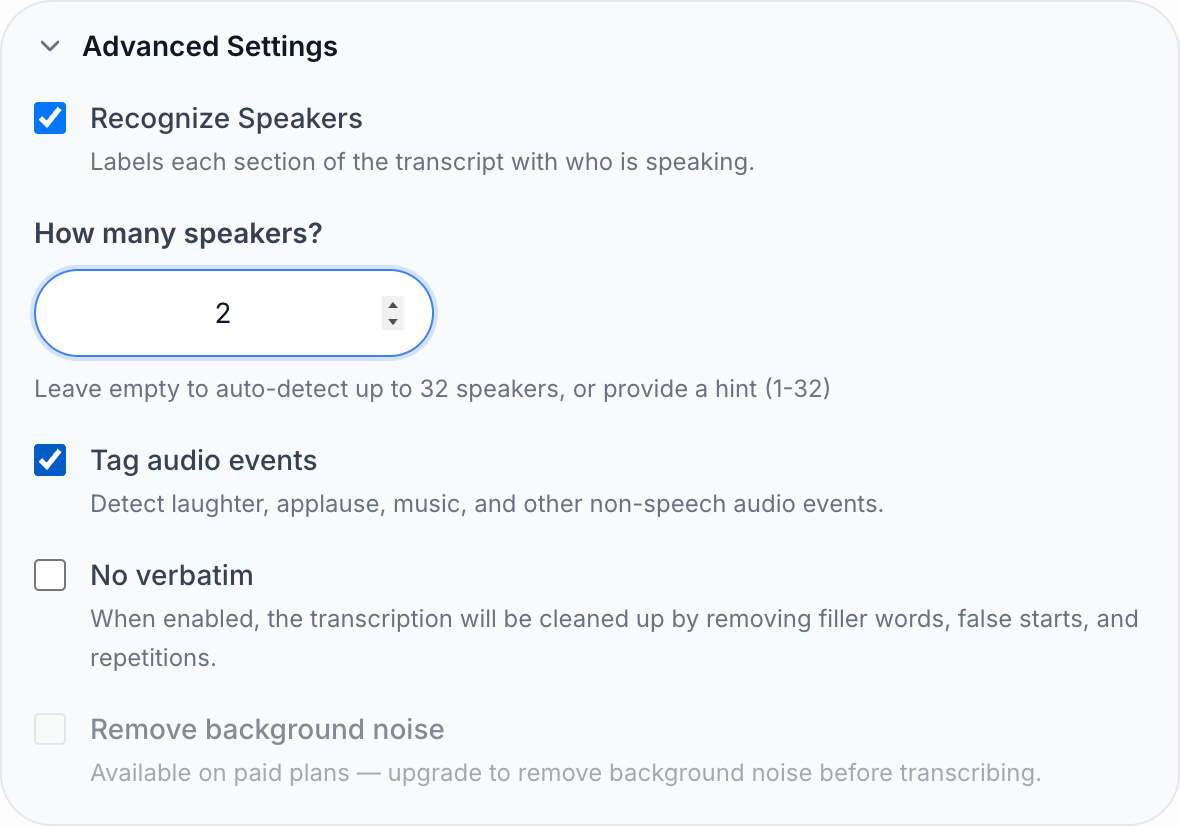
Two more options sit in the same dialog on paid plans. Keyterms (custom vocabulary) lets you list names and field terms before you transcribe, at 1.25 times the file's minutes. Remove background noise cleans up a noisy room first, at 2 times the minutes, for files up to 60 minutes and 500 MB. Neither is available on the free account we used, so "Remove background noise" is greyed out in the screenshot. Our interview didn't need either: field terms like "IEP" (a student's individual education plan), "Seesaw" and "scaffolded" came back right without them, and so did both proper names.
You don't have to wait on the page. Each of our runs came back in about 10 seconds, and an hour of audio takes about 2 minutes. An email arrives when the transcript is ready.
Check the transcript against the audio
Accuracy is 99% on clean audio, which still leaves words to check in a long interview. The ones that matter most in research are names, numbers, field terms and anything you might quote.
Click a timestamp or a word and the player jumps to that moment, so you can read the quotes you expect to use while the audio plays. On our run, one sentence had broken in two: "weekend." ended up alone on its own line at 0:29, with no speaker label. Putting the cursor at the start of that line and pressing Backspace joined it back to the sentence before.
Then rename the speakers. Open the label next to a turn, choose the pencil next to the name, type a code and choose All paragraphs. We changed Speaker 1 to Interviewer and Speaker 2 to P07, the participant's code in our study. The change applies to every turn at once and carries into the exports.
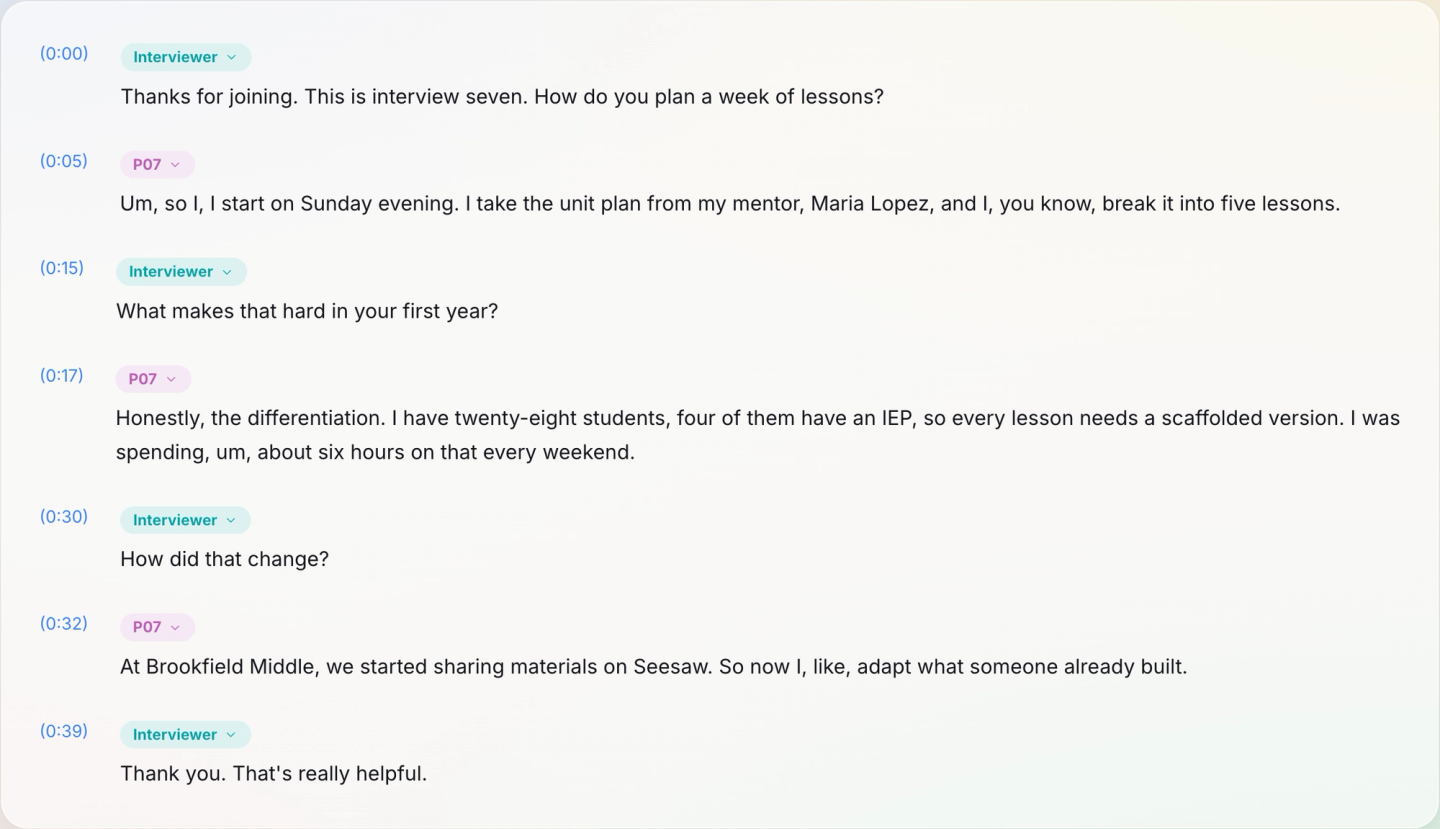
Use participant codes here, never names. A transcript is shared, exported and copied far more often than the recording, so it is the file most likely to travel.
Export a file you can code
Choose Export, pick a format and keep both switches on: Include speaker names and Include timestamps. All six formats (TXT, MD, SRT, VTT, PDF and DOCX) are available on every plan.
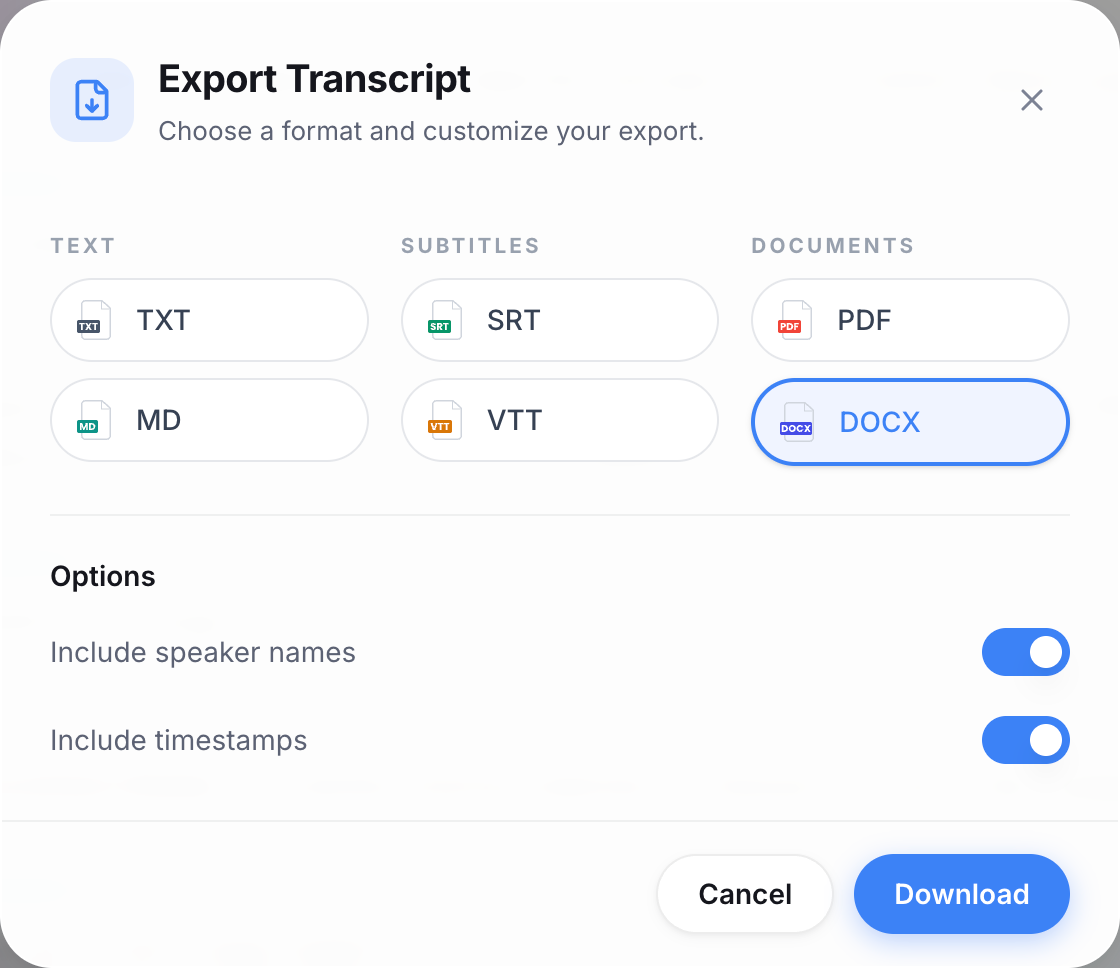
For coding, DOCX or TXT is usually the right pick. Most qualitative analysis tools import Word or plain-text documents; check your tool's import page for the format it prefers. Our Word file opened with the file name, language, duration and date at the top. Below that, each turn sat under its speaker's name with a timestamp in front, like "[0:05] Um, so I, I start on Sunday evening." Those timestamps are what let you go from a coded excerpt back to the exact moment in the recording. The TXT export has the same layout in plain text.
Anonymise in the exported file
Our participant named her mentor, Maria Lopez, and her school, Brookfield Middle. Both have to go before the transcript is shared with a co-coder or quoted in a paper.
Do this in the exported Word file:
- Keep one key file that maps each real name to its placeholder, stored apart from the transcripts.
- Use Find and Replace for each name across every transcript in the study, so "Maria Lopez" becomes "[mentor]" everywhere and "Brookfield Middle" becomes "[school]".
- Read the file once more for indirect identifiers: a job title in a small team, a rare event or a hometown.
Working on the exported files keeps the placeholders consistent across a whole set of interviews, and the original transcript stays in your account as the version to check against the audio. If your ethics approval says where data may be stored, follow that before you upload anything. Our post on questions to ask before uploading a confidential interview covers what to check. PrismaScribe uses enterprise-grade encryption and doesn't use your files to train models.
Focus groups and interviews in other languages
Our run was a two-person interview in English, so this part is advice rather than something we show. Focus groups are harder than one-to-one interviews for any transcription method. People talk over each other, and the quietest voice is often furthest from the microphone. Put the recorder in the middle of the table and ask each person to say their first name at the start, so you can match voices to labels. Then rename the labels to codes the same way as above.
For interviews in another language, PrismaScribe transcribes 99+ languages and can translate the transcript, with speaker labels kept. Code from the original-language transcript and use the translation for co-coders and quotes; multilingual transcription has the details. If you also transcribe interviews outside research, see our page on interview transcription.
Plan the minutes for a whole study
The Free plan gives 30 minutes a month, 15 minutes a day and files of up to 15 minutes each. That's enough to test your settings on a short pilot like ours: both versions of the 42-second interview together used under two minutes. A typical 45 to 60-minute interview needs a paid plan: Starter is $7 a month for 5 hours, with files up to 5 hours long. Top-up hours are the other route. They never expire, so a study with a few interviews a term doesn't need a monthly plan. Current prices are on the pricing page.
Once the transcripts are exported and anonymised, the transcription work is done and the analysis starts. Our guide to coding interview transcripts into themes picks up from exactly this point.
Frequently asked questions
Is automated transcription accurate enough for qualitative research?
On clean audio it's about 99% accurate, which leaves a few words per page to check. Read every passage you plan to quote against the audio, and check names, numbers and field terms. Clicking a word plays that moment, so the check takes minutes, not hours.
Should qualitative interviews be transcribed verbatim?
It depends on your method. Conversation and discourse analysis need verbatim because pauses, fillers and repairs are part of the data. Thematic and content analysis usually work from clean transcripts. Decide before you upload, because switching later means transcribing the file again.
Can PrismaScribe tell focus group participants apart?
Yes, it labels up to 32 speakers in one recording, and you can tell it how many to expect. If a turn ends up under the wrong label, open that label and pick the right speaker for just that paragraph. Moments where people talk over each other are the ones to listen to again.
What file format should I export for NVivo or ATLAS.ti?
Word (DOCX) or plain text are the usual choices, with speaker names and timestamps switched on. Check your tool's import guide for the format it prefers. The export keeps the speaker names you set, so participant codes come through as written.


Turn hours of audio into searchable text
Upload a file or paste a link. Speaker labels, translations, and six export formats included.