
Voice-to-Text, Speech-to-Text And Transcription: What's the Difference?
Voice-to-text, speech-to-text, and transcription are often treated as interchangeable terms, but they describe different parts of the process. Speech-to-text refers to the technology that turns spoken words into written text, voice-to-text commonly describes live dictation, and transcription usually refers to creating a structured written record from an existing recording. Understanding the difference makes it easier to choose the right tool for your workflow. This guide compares when each approach makes sense, what affects accuracy, how speaker labels and export formats fit into transcription, and where PrismaScribe fits when you need accurate voice-to-text transcription online from recorded audio or video.

Armin
Published 5 min read

Key takeaways
- Speech-to-text is the underlying technology, while voice-to-text and transcription describe different ways of using it.
- Voice-to-text is generally suited to live dictation, while transcription works with existing audio or video recordings.
- Transcription adds structure such as punctuation, paragraphs, speaker labels, and exportable formats.
- Audio quality, overlapping voices, accents, names, and specialist terms can all affect transcription accuracy.
- Choose a tool based on whether your speech is live or recorded, how many speakers are involved, and how you plan to use the text.
Speech to text, voice to text and transcription all turn spoken words into written words, but they aren't the same thing. Speech to text usually means technology, voice to text usually means live dictation, and transcription usually means a finished written record of a recording. If you need an accurate voice to text transcription online, the difference decides which tool you pick.
The terms get used interchangeably, so it's easy to choose the wrong one. This guide explains each term, where they overlap and how to choose.
What is speech to text?
Speech to text is the technology that converts spoken audio into written words. It's also called speech recognition. Dictation on a phone, automatic captions and transcription services all rely on speech to text in some form, so the label describes an ability, not a specific product.
What is voice to text?
Voice to text usually means dictation: you speak, and words appear as you talk, in a message or a document. It's built for short bursts and quick notes. The output often has little structure, since it doesn't label speakers or keep a lasting record of a conversation. In practice, voice to text is speech to text happening live.
What is transcription?
Transcription produces a complete written record from a recording, usually after the fact. Beyond the words, it adds the structure that makes text usable: punctuation, paragraphs, speaker labels and formats you can export. Transcription is a workflow built on speech to text, plus the clean-up around it.
PrismaScribe works this way. You record, upload the file, and get a transcript with labels for up to 32 speakers, in 99+ languages, exportable as TXT, SRT, VTT, PDF, DOCX or Markdown.
How do speech to text, voice to text and transcription compare?
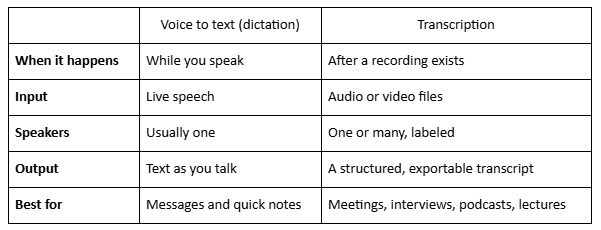
Speech to text is the technology underneath both, while voice to text and transcription are two ways of using it. This table shows the practical differences:
When should you use speech to text for dictation, and when do you need transcription?
Use dictation-style speech to text when you're the only speaker and want words on the page now. Use transcription when the audio already exists, has more than one voice, or needs to be searched, quoted or shared.
- Dictate short notes, drafts and messages.
- Transcribe meetings, interviews, podcasts, lectures and calls.
- Upload a long dictation and treat it as a transcription job if you want speaker labels, exports or a searchable record.
Paste a link, get a searchable transcript
Free plan includes 30 minutes of transcription every month. No credit card.
What does "accurate" mean for speech to text?
Accuracy depends on the audio as much as the software. Any speech to text tool works best on clean recordings, and PrismaScribe reaches 99% accuracy on clean audio. Noise, overlapping voices, strong accents and unfamiliar names tend to lower it, so a review is always part of the job.
- Keep the microphone close to the speaker.
- Record in a quiet room, with one voice at a time.
- Add names and terms. On paid plans, custom vocabulary lets you add names, jargon and acronyms before you upload.
- Try noise removal on paid plans for messy recordings.
- Check names and numbers against the audio, since those are the most common corrections.
For more, see how accurate AI transcription really is.
How does PrismaScribe fit in?
PrismaScribe is an upload-based transcription service built on speech to text technology, not a live dictation tool. You upload a recording, and about an hour of audio takes about 2 minutes to transcribe. It's fast, but asynchronous.
You can choose clean-up, which removes filler words and false starts, or verbatim, which keeps every word. The free plan includes 30 minutes of transcription a month, with files up to 15 minutes. Paid plans are $7, $20 and $40 a month, or less if billed annually.
How do you choose a speech to text tool?
Start with the audio, not the feature list. Five questions cover most decisions:
- Is the audio live or recorded? Live points to dictation. A file points to transcription.
- How many people are speaking? More than one means you'll want speaker labels.
- Which languages are involved? Check that yours is supported. PrismaScribe covers 99+.
- What format do you need? Documents, captions and notes each suit different exports.
- Who will review it? Plan time to check names, numbers and terms.
For the difference between live and upload-based tools, see how live and batch transcription differ. If you only need text from a file, why some users only need audio transcription online covers the simple case.
What should you do next?
Decide whether your audio is live or recorded, test one clean file, and read the result against the recording. If you're comparing speech to text options, use the same file in each so the comparison is fair. A short test on your own audio tells you more than any definition.
Frequently asked questions
Is speech to text the same as transcription?
Not quite. Speech to text is the technology that turns spoken audio into words. Transcription is a full workflow built on it, adding punctuation, speaker labels and exports to produce a finished record.
What makes accurate voice to text transcription online reliable?
Clean audio matters most. PrismaScribe reaches 99% accuracy on clean audio, and names, numbers and unfamiliar terms are the parts most worth checking before you rely on the text.
Is voice to text the same as dictation?
Usually, yes. Voice to text most often means speaking and seeing words appear as you talk, which is dictation. Transcription works from a finished recording instead.
Does PrismaScribe do live speech to text?
Not as dictation. PrismaScribe transcribes recordings. The one live option is the meeting bot, which can transcribe a Zoom, Google Meet or Microsoft Teams call while it happens.
Which export format should I choose?
DOCX and PDF suit sharing and editing, Markdown suits notes tools, TXT gives plain text, and SRT and VTT are for captions.


Turn hours of audio into searchable text
Upload a file or paste a link. Speaker labels, translations, and six export formats included.