
Knowledge base from call recordings: turn calls into help articles
Transcribe support calls, find the questions that repeat, remove personal details and rewrite each answer as a short help article with steps.

Armin
Published 10 min read

Key takeaways
- Customers' own words on calls give you article titles and show which questions to write first.
- Rename the speakers "Agent" and "Customer" so you can read questions and answers separately.
- Start with a sample of a few dozen calls and count which questions repeat.
- Every file rounds up to a whole minute, so a 90-second call uses two.
- Never paste a transcript: the question becomes the title, the answer becomes the steps.
Your agents explain the product out loud all day, and those answers sit in recordings nobody plays again. A knowledge base from call recordings starts from what customers actually ask, in their own words, instead of from what the team guesses they need. This guide covers the whole route: transcribe the calls, label agent and customer, find the questions that repeat, remove personal details and rewrite each answer as a short article with numbered steps.
Why build a knowledge base from call recordings
Customers rarely describe a problem the way the team that built the product would. They don't search for "update account contact record"; they search for "change my email" or "why did my invoice go to the wrong person". Calls hold that language, along with the follow-up questions that become edge cases, and they show what to write first: the question that comes up most often. They also check the articles you already have. If customers keep calling about something the help center covers, the article is hard to find or hard to follow, and the transcript shows you which.
Get the transcripts ready
Export the recordings from your phone system; its help pages list the formats it can export. PrismaScribe takes MP3, WAV, M4A, MP4 and other common audio and video formats, and our audio to text page lists the rest. The upload dialog takes several files at once, and about an hour of audio takes about 2 minutes, so you can close the page and come back.
Three settings in the upload dialog matter for this job:
- Keyterms, the field right under Audio Language. This is custom vocabulary: add product names, plan names, feature names and error codes before you run the files, because they're the words a transcript most often gets wrong. In our test call below, the one word it missed was the company name. Keyterms count as 1.25 times each file's minutes, and the field remembers your last list in that browser, so clear it for files that don't need it. Save current list keeps a product glossary under My lists.
- Recognize Speakers, under Advanced Settings and on by default. Support calls have at least two voices, and PrismaScribe can tell up to 32 apart. Leave How many speakers? empty when a call may have been transferred.
- No verbatim, also under Advanced Settings and off by default. Switch it on to remove filler words and false starts; leave it off when the exact wording matters.
When the transcript is ready, rename the speakers so the question and the answer read separately:
- Click a speaker's name above their paragraph.
- Use Rename speaker (the pencil) and type "Agent" or "Customer".
- Keep All paragraphs selected, the default, so every line from that voice changes.
Find the questions customers ask most
Don't try to read every call. Take a few dozen recent ones and skim only the customer's opening question in each. Then count:
- Tag each call in your library by topic, such as "billing" or "exports". You can select several files and tag them together.
- Filter the library by tag to see how many calls each topic has.
- Inside the biggest topics, write each question in the customer's words and tally the ones that repeat. Those are the articles to write first.
Pay attention to calls where the agent had to look something up or transfer the customer. Those are the questions the team couldn't answer from memory, which makes them strong candidates for a new article.
Search helps, with one catch. Inside an open transcript, Find in transcript highlights every match, dims the paragraphs without one and steps through the rest, so "how do I", "I can't" and "why is" take you straight to the questions. The library's search box matches file names only, not the words inside, so rename each file in the library by date and topic. To search the text of a whole batch, export each transcript as TXT from the web, one at a time, into one folder and run your computer's file search on it. That works for a sample of a few dozen, not for hundreds.
Protect customers when you use their calls
Recorded calls contain names, account numbers, addresses and sometimes payment details. None of that belongs in a public article or a shared spreadsheet, so treat redaction as a required step.
Many phone platforms pause recording while a customer reads out card details; check yours, and don't upload a call that contains them. Don't count on the transcript to remove anything: it records what was said. Clean the text yourself on the web before anyone copies it into a draft, and every export carries your edits. Write articles from the pattern of the question, never from one customer's story. "A customer asked how to change their billing email" is fine; anything that could identify the person isn't.
Paste a link, get a searchable transcript
Free plan includes 30 minutes of transcription every month. No credit card.
Your recording notice tells customers that calls may be recorded, but it may not cover sending them to a transcription service or using their words in content, so check its wording with whoever owns privacy before you start. For how we store and handle your files, see our privacy policy.
Rewrite a call answer as a help article
Never paste a transcript into an article. Spoken answers wander and assume context. Turn each part of the conversation into one piece of the article instead:
- The customer's opening question becomes the title, in their wording.
- The agent's first direct answer becomes the opening sentence.
- The steps the agent walked through become a numbered list, one action per step.
- The customer's follow-up questions become short sections for edge cases.
- The agent's "if that doesn't work" advice becomes a troubleshooting note at the end.
A worked example: from a support call to an article
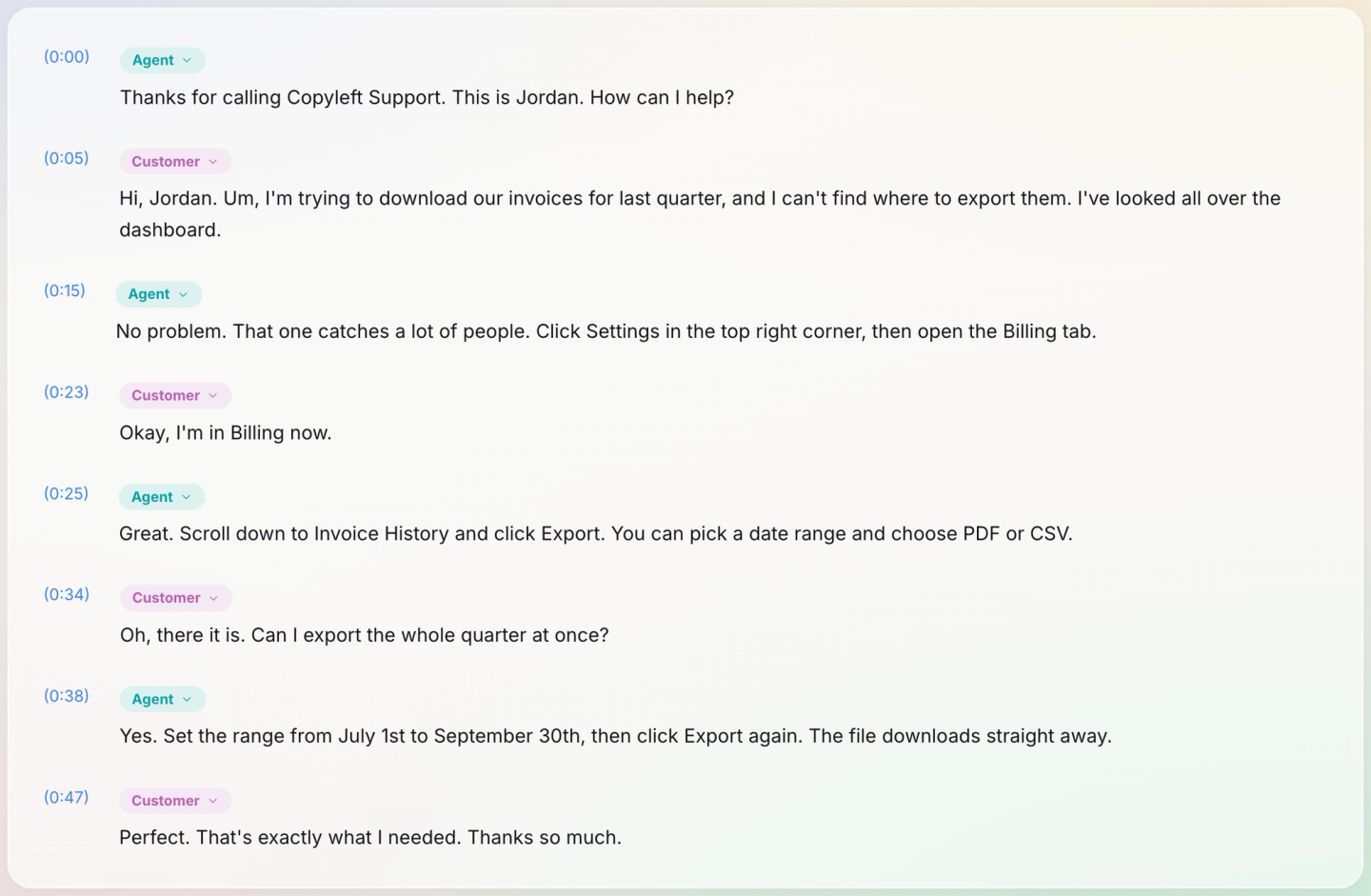
To test this, we made a 51-second support call with two computer voices: a customer of an invented company, Copperleaf, who can't find where to export invoices, and an agent named Jordan who walks them through it. We uploaded it with Recognize Speakers on, No verbatim off and no Keyterms. The transcript was ready about 16 seconds after we clicked Transcribe, it used one minute of the allowance, and every paragraph landed on the right speaker. After renaming, the call read:
- Agent (0:00): Thanks for calling Copyleft Support. This is Jordan. How can I help?
- Customer (0:05): Hi, Jordan. Um, I'm trying to download our invoices for last quarter, and I can't find where to export them. I've looked all over the dashboard.
- Agent (0:15): No problem. That one catches a lot of people. Click Settings in the top right corner, then open the Billing tab.
- Customer (0:23): Okay, I'm in Billing now.
- Agent (0:25): Great. Scroll down to Invoice History and click Export. You can pick a date range and choose PDF or CSV.
- Customer (0:34): Oh, there it is. Can I export the whole quarter at once?
- Agent (0:38): Yes. Set the range from July 1st to September 30th, then click Export again. The file downloads straight away.
- Customer (0:47): Perfect. That's exactly what I needed. Thanks so much.
Every word matched what was said except the company name, which came back as "Copyleft". We hadn't added it as a Keyterm, which is exactly the case Keyterms are for, and fixing it took one edit: click into the line, retype the word, and the page saves on its own. Keep in mind this was clean audio from computer voices. A real phone line with crosstalk and hold music will need more correcting. The "Um" is there because No verbatim was off; it simply doesn't get copied into the article.
The customer used two words, "download" and "export". "Export" is the word on the button, so it goes in the title, and "download" goes in the first line so a search for either finds the article. Its title: Where to export your invoices. Its opening sentence: "To download your invoices, export them from the Billing tab in Settings as a PDF or CSV file for any date range." Its steps:
- Click Settings in the top right corner and open the Billing tab.
- Scroll down to Invoice History and click Export.
- Pick a date range and choose PDF or CSV.
- Click Export again. The file downloads straight away.
And one edge case from the follow-up question: to get a whole quarter in one file, set the range to cover it, for example July 1 to September 30, before you click Export. The greeting, the "Um" and the thanks stay in the call.
Have an agent or product owner check each draft against how the product works today. A transcript records what was said, and agents can be wrong or out of date.
Keep the articles current
Once a month, transcribe a fresh sample and compare its top questions with your articles. A new question means something changed or confuses people. A question you've already answered that keeps coming up means the article needs a better title or a clearer opening. When the product ships a change, search your help articles for the old behavior and update or retire every one that mentions it.
What it costs in minutes
Every file is rounded up to the next whole minute, after the 1.25 times for Keyterms, so short calls cost more than their length suggests:
- Free: 30 minutes a month, 15 a day and 15 per file, one file at a time, and no Keyterms. A 90-second call counts as 2 minutes, so fifteen of them fill the month, and at seven a day they take three days.
- Starter: 5 hours a month. Thirty calls of exactly eight minutes with Keyterms count as 30 × 10 = 300 minutes, the whole month; an 8:10 call already counts as 11.
- Premium and Pro: 20 and 40 hours, enough for a bigger sample plus a monthly refresh.
Current limits are on the pricing page. If your team also records internal meetings, the same approach works there: our guide to turning internal meetings into a knowledge base covers that side.
Start with one product area: upload fifteen short calls, which fit Free's month, or a few dozen on a paid plan, and write the three articles that answer the most repeated questions. See how they do before you widen the sample.
Frequently asked questions
How many calls do you need to start?
A few dozen from one product area is a reasonable starting point for seeing which questions repeat. Pick them from different agents, days and issue types, so one unusual week doesn't skew the count. If one question clearly leads, write that article first and keep sampling while you do.
Can PrismaScribe handle long or transferred calls?
Yes, within your plan's file length: 15 minutes on Free, 5 hours on Starter and Premium, and 8 hours 20 minutes on Pro. On Free, the web upload transcribes only the first 15 minutes of a longer call unless you have top-up hours, which lift the per-file and daily limits but not the 500 MB file size. A transfer usually shows up as a third speaker, but two similar voices on a phone line can merge, so check the labels after a transfer.
Who should approve the articles?
Someone who knows how the product works today, usually a senior agent or the product owner for that area. If an article covers billing, security or privacy, ask the team that owns it to read the draft as well, since those are the articles customers act on with their money or their data.
Can the same transcripts feed an FAQ page?
Yes. Customers' follow-up questions make good FAQ entries. Export the transcript as TXT, DOCX or Markdown on the web, all available on every plan; the export includes your edits, so a file you've already cleaned of personal details stays clean. Write each answer in your own words and keep it short.


Turn hours of audio into searchable text
Upload a file or paste a link. Speaker labels, translations, and six export formats included.