
How To Code Interview Transcripts Into Themes: A Workflow For Ux And Academic Researchers
Coding interview transcripts is more than highlighting interesting comments. For UX and academic research, a consistent process helps turn participant responses into themes that can be reviewed, compared, and supported with evidence. PrismaScribe can provide the speaker-labeled transcripts that form the starting point for this workflow. From preparing and cleaning transcripts to assigning participant IDs, creating descriptive codes, building a codebook, grouping codes into themes, checking contradictory responses, and finding representative quotes, each step helps keep the analysis traceable to the original interviews.

Armin
Published 6 min read

Key takeaways
- Start with accurate, speaker-labeled transcripts before coding interviews.
- Use descriptive codes and a clear codebook to organize participant responses.
- Group related codes into meaningful themes that reflect patterns across interviews.
- Check themes against the full dataset, including responses that challenge your findings.
- Use consistent transcription, participant IDs, and quote verification to keep the analysis reliable and traceable.
To code interview transcripts into themes, transcribe every interview with speaker labels, read them all once without coding, tag short passages with descriptive codes, group related codes into themes, then check each theme against the full transcripts. A reliable interview transcription tool gives you the clean, labeled text this process depends on.
Coding is where interview research either becomes rigorous or turns into cherry-picking. The workflow below works for UX studies and academic projects alike, and it keeps every theme traceable back to what participants said.
Why does an interview transcription tool matter before you start coding?
Your codes are only as trustworthy as the text they sit on. If speakers are mixed up or names and terms are wrong, you'll code the errors along with the content. Before any analysis, you want a transcript where every line is attributed to the right person and the wording is accurate enough to quote.
PrismaScribe reaches 99% accuracy on clean audio and can label up to 32 speakers. For a one-to-one interview, that means two labels: interviewer and participant. Clear audio with one voice at a time gives you the strongest starting point. If your recordings are less than ideal, see how to get more accurate transcriptions from noisy audio.
How do you prepare and transcribe interviews for analysis?
Choose an interview transcription tool that exports labeled text, record with consent, then upload each file. Start by confirming your consent form covers recording, transcription and data storage, and follow your ethics board or company policy for anything more specific.
- Record each interview in a quiet space, with the participant's permission.
- Add key terms. On paid plans, add participants' names and technical terms to custom vocabulary before uploading, and use background-noise removal on messy recordings.
- Upload the file to PrismaScribe. About an hour of audio takes about 2 minutes to transcribe. It's fast, but asynchronous, so plan a short wait.
- Check the speaker labels and rename them to "Interviewer" and "P01", "P02" and so on.
- Export the transcript as DOCX, Markdown, PDF or TXT, whichever your analysis setup prefers.
The free plan covers 30 minutes of transcription a month, with files up to 15 minutes, so it works for a short test but not a full-length interview. Paid plans are $7, $20 and $40 a month, or less if billed annually.
Why use participant IDs instead of names?
Swapping names for IDs like P01 keeps working files less identifying and makes it easier to share excerpts with colleagues. Keep the key linking IDs to real people in a separate, protected file. This is a research-hygiene step you do in your working copy.
How do you clean a transcript without changing what people said?
Paste a link, get a searchable transcript
Free plan includes 30 minutes of transcription every month. No credit card.
PrismaScribe has two modes: clean-up, which removes filler words and false starts, and verbatim, which keeps every word. If your method treats hesitations as data, choose verbatim. If you only need the content, clean-up is fine. Pick one before you begin and use it for every interview, since mixing styles makes transcripts harder to compare. Then correct names, numbers and terms against the audio.
How do you code interview transcripts step by step?
Read everything first, then code in passes. Resist tagging on the first read, because early impressions often turn out to be one participant's story rather than a pattern.
Step 1: Read all transcripts once, uncoded
Read for familiarity. Jot loose impressions in a separate document, not in the transcript margin. You're looking for what surprised you.
Step 2: Do a first pass of open coding
Tag short passages with plain descriptive labels, such as "workaround for exporting" or "unsure who to ask". Stay close to what the participant said. Aim for descriptions, not conclusions.
Step 3: Build a codebook
Collect your codes into a list with a one-line definition and one example quote for each. Merge duplicates and split codes that cover two ideas. A shared codebook keeps a second coder, or you three weeks later, consistent.
Step 4: Group codes into candidate themes
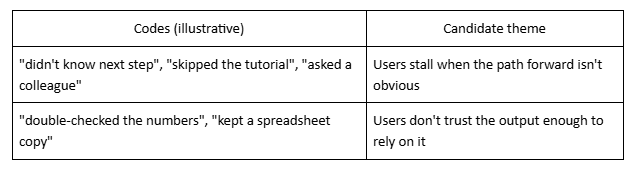
A theme is a pattern of meaning across participants, not a topic label. "Onboarding" is a topic. "People abandon setup when they can't tell what happens next" is a theme. This illustrative example shows how codes roll up:
Step 5: Test each theme against the data
Go back to the full transcripts and ask whether the theme holds across participants, and whether any interview contradicts it. Note contradictions rather than dropping them; they often sharpen the theme or reveal a subgroup.
How do you find and pull quotes efficiently?
Search your exported transcript for your code words and cue phrases, then check each match in context before you use it. Return to the audio to confirm tone and wording for any quote you plan to publish. Speaker attribution is what lets you say which participant said what, and what speaker detection does in an interview transcription tool explains how those labels are assigned.
Use short, representative quotes and attribute them by ID, not by name. Keep the surrounding sentence so the quote isn't stripped of meaning.
How do you keep the analysis defensible?
Document your decisions as you go: codebook versions, how you resolved disagreements, and which interviews support each theme. Two things make findings hold up to scrutiny: a second person coding a sample and comparing results, and a note of any data that didn't fit.
For academic work, follow your discipline's conventions for reporting method. For UX work, a short methods note in your readout is usually enough.
Which export format works best for coding?
Pick the format your workflow already handles. DOCX suits commenting and highlighting in a word processor, Markdown suits note-taking tools, TXT is the safest plain-text choice for importing elsewhere, and PDF is best for a read-only copy. SRT and VTT are caption formats and rarely useful for coding. For more, see how to export SRT and other formats.
What should you do next?
Run one pilot interview through the whole workflow before you commit to the full set: transcribe it, fix the labels, code it and draft one theme. You'll find gaps in your process while the stakes are low. Then apply the same steps to the rest, and revisit your codebook as new interviews arrive.
Frequently asked questions
What makes a good interview transcription tool for research?
Accuracy on your audio, clear speaker labels and exports in formats your analysis workflow can use. PrismaScribe offers 99% accuracy on clean audio, labels up to 32 speakers, and exports to TXT, SRT, VTT, PDF, DOCX and Markdown.
How many interviews do I need before I start coding?
There's no single number. Many researchers code one or two early to test their approach, then continue as more arrive. The right count depends on your method, your question and your discipline's standards.
Should I remove filler words from the transcript before coding?
It depends on your method. PrismaScribe offers clean-up and verbatim modes, so you can keep every word if you analyze how people speak, or remove filler if you focus on content. Apply the same choice to every transcript.
Does PrismaScribe code or tag themes for me?
No. PrismaScribe produces the transcript with speaker labels and exports it. The coding, theme building and interpretation are yours, which is where the judgment in the analysis belongs.
Can I use the free plan for a full interview?
Not for a long one. The free plan gives you 30 minutes a month, and each file can be up to 15 minutes. Paid plans allow much longer files, up to 5 hours on Starter and Premium, and start at $7 a month.


Turn hours of audio into searchable text
Upload a file or paste a link. Speaker labels, translations, and six export formats included.