
AI-Powered Transcription

Convert OGV to Text — Fast, Accurate AI Transcription

Transcribe OGV video files to text with 98%+ accuracy across 99+ languages. PrismaScribe automatically extracts audio from Ogg Video containers — ideal for open-source projects, Linux users, and web content.

Users

Join 10,000+ professionals

convert OGV to text

98.5%

accuracy rate

99+

languages supported

Up to 32

speakers detection

5 hours

max audio length

Trusted by creators and professionals worldwide

Journalists

Media Houses

Podcast Network

Content Creators

Universities

Researchers

How to Convert OGV to Text

1
1

Upload Your OGV File

Drag and drop your OGV file directly into our site, or upload from your device. PrismaScribe automatically extracts the audio track from your video — no manual conversion needed. We support 15+ audio and video formats.
2
2

Let AI Transcribe Your Video File

Our AI-powered transcription service gets to work immediately. It analyzes speech patterns, detects different speakers, and applies speaker labels automatically. The transcription process handles everything from quiet voice notes to noisy recordings with multiple participants.
3
3

Download and Edit Your Transcript

Your transcript is ready in minutes. Download it as TXT for plain text or SRT for subtitles. Edit the transcript directly in our built-in editor, search through your text for specific quotes, and share with your team. Every word is timestamped for easy reference.

See How OGV Transcription Works

Professional transcription in three simple steps
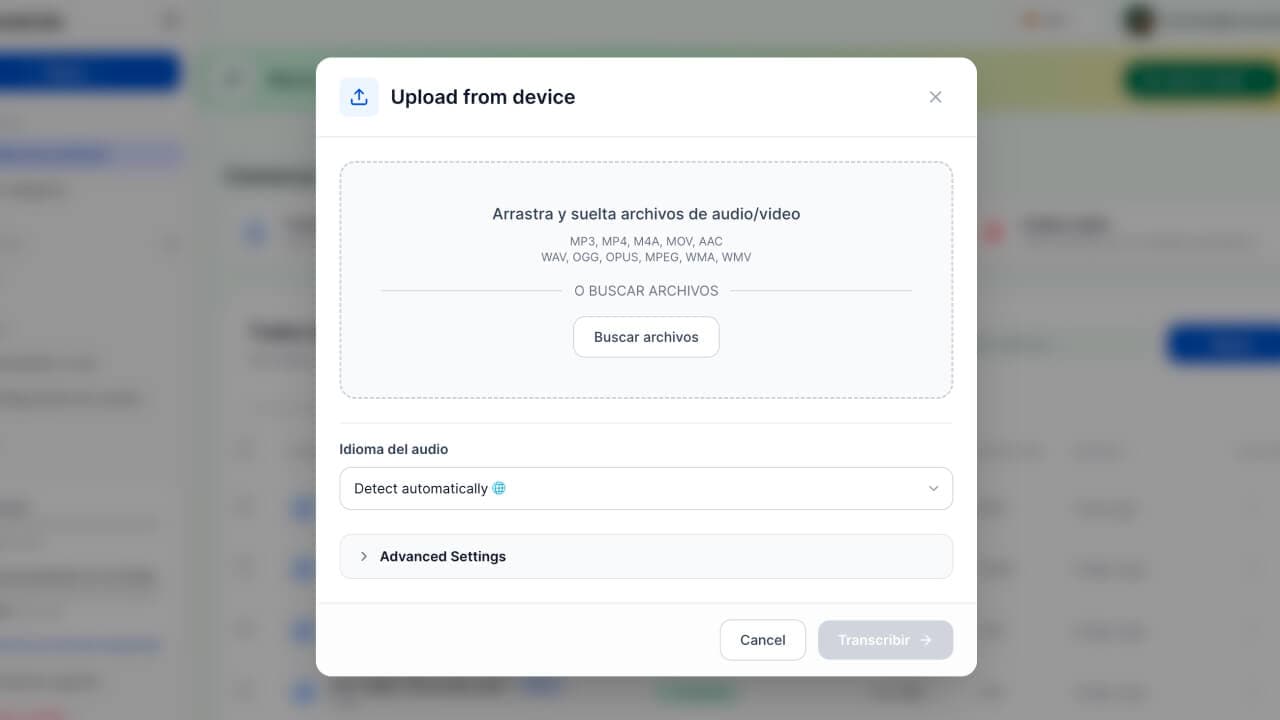
Upload Your OGV File

01

Upload Your OGV File

Drag and drop your OGV video file. PrismaScribe extracts the audio track automatically. We support OGV and 15+ other formats.

Upload

Why Use Our OGV to Text Converter

98%+ Accuracy

98%+ Accuracy

Advanced AI speech recognition handles background noise, accents, fast speech, and technical jargon. Get accurate transcripts you can rely on for professional work. Upload a video file in any language and get a transcript you can edit, download, and use right away.
Lightning-Fast Speed

Lightning-Fast Speed

Convert OGV to text for a 1-hour video file in roughly 2 min. No more spending 4-6 hours on manual transcription. Upload your file, and the AI delivers professional results while you focus on what matters.
99+ Languages

99+ Languages

Transcribe video in English, Spanish, French, Arabic, Japanese, Mandarin, and 93+ more languages. Automatic language detection means you don't need to select a language — just upload and transcribe. Our speech-to-text AI supports every major language family.
Private and Secure

Private and Secure

Your files are encrypted in transit and at rest. We follow strict privacy standards so your recordings and transcripts stay confidential.
Supported audio and video file formats for transcription
Universal Compatibility

Supported Video Formats and File Formats

PrismaScribe isn't limited to OGV. Upload audio or video files in any of these 15+ formats and convert them to text: MP3, MP4, WAV, M4A, AAC, OGG, FLAC, WMA, MOV, AVI, MKV, WEBM, FLV, WMV, 3GP, OGV.

No need to convert your files first — our text converter handles all major file formats directly. Upload video in multiple formats and get your transcript back in minutes.

AI transcription accuracy with speaker labels
Industry-Leading AI

Transcribe OGV to Text with 98%+ Accuracy

Most free transcription tools struggle with real-world video. Background noise, overlapping speakers, and regional accents cause errors that take hours to fix. You end up spending almost as long editing the transcript as you would doing manual transcription from scratch.

PrismaScribe's AI is built for these challenges. Speaker diarization identifies up to 32 different speakers and applies speaker labels throughout the transcript. Audio event detection catches laughter, applause, and other non-speech sounds so context is never lost.

Fast OGV to text conversion speed comparison
Save Hours Every Week

Faster Than Manual Transcription

Manual transcription takes 4-6 hours for every hour of video. Professional transcription services can take days and cost significantly more. With PrismaScribe, upload a 1-hour OGV file and get your transcript back in about 2 min. A 15-minute interview? Done in seconds.

Our automatic transcription software processes speech at near real-time speed, so you're never waiting around. If you transcribe recordings regularly — weekly podcasts, daily meeting notes, research interviews — you'll save dozens of hours every month.

Upload video from any device or source
Any Source, Any Device

Convert Video from Any Device or Source

Record on your phone, laptop, or external microphone — it doesn't matter. PrismaScribe accepts video files from any source. Upload directly from your device or drag and drop files into the browser. Built-in microphone recordings, voice memos, and video from any app all work.

PrismaScribe automatically extracts and transcribes the audio track from your video files. No need to separate the audio yourself — just upload the OGV file and get your transcript.

Who Uses Our Text Converter

Content Creators and Podcasters

Turn podcast episodes and video recordings into blog posts, show notes, and social media content. Upload video files and repurpose hours of speech into searchable, shareable text in just a few clicks.

Business Professionals

Transcribe meeting recordings and conference calls into actionable notes instantly. Search through transcripts to find specific decisions, action items, or quotes without replaying entire recordings.

Journalists and Researchers

Transcribe interviews and focus groups quickly. Get word-level timestamps to locate exact quotes in your transcript. Work across languages with support for 99+ languages and automatic language detection.

Students and Educators

Turn lectures and tutorials into clear study notes. Review what was said without rewinding. Make educational content more accessible for students who learn better from reading text.
Trusted by Professionals

What Users Are Saying

Join thousands who've transformed their content workflow

"I transcribe OGV to text for our weekly podcast — what used to take 6 hours now takes 15 minutes. The accuracy with multiple speakers is remarkable."
SM

Sarah M.

Podcast Producer (Independent)

Frequently Asked Questions

Everything you need to know about converting OGV to text

Upload your OGV file to PrismaScribe and the platform extracts the audio from the Ogg container automatically, then transcribes it with AI. Processing takes about 2 min on average, and you can download your transcript as TXT or SRT.
PrismaScribe delivers 98%+ accuracy on OGV files with clear spoken audio. The platform handles Vorbis and Opus audio codecs commonly used in Ogg containers, ensuring reliable decoding and high-quality transcription results.
PrismaScribe supports 15+ audio and video formats in total, so whether your content is in OGV, MP4, MKV, or any other common format, you can transcribe it on a single platform. All formats export to TXT and SRT.
Yes, PrismaScribe applies speaker diarization to OGV files and can identify up to 32 speakers per recording. Each speaker is labeled clearly in the transcript, making it easy to follow multi-person discussions in your OGV recordings.
Absolutely. PrismaScribe's free plan supports OGV along with all other accepted formats, so you can test transcription quality on your Ogg Video files without paying anything. The free tier includes automatic audio extraction and the full AI transcription pipeline.
OGV (Ogg Video) is an open-source multimedia container developed by the Xiph.Org Foundation. It's widely used in Linux environments, Wikipedia media files, and open-source software projects. PrismaScribe natively supports OGV, so you can transcribe this format without converting to a proprietary alternative.
Yes, PrismaScribe handles OGV files encoded with Theora video alongside Vorbis or Opus audio tracks. The platform focuses on the audio layer for transcription purposes, so regardless of whether your video uses Theora or another codec within the Ogg container, you'll get 98%+ accurate transcripts.
Yes, Wikimedia Commons uses OGV as its primary video format, and PrismaScribe processes these files seamlessly. Upload the OGV file downloaded from Wikipedia or Wikimedia Commons, and PrismaScribe will extract the audio and produce a full text transcript or SRT subtitle file.

Still have questions? Contact our support team

Start Transcribing Your OGV Files Today

Stop wasting hours on manual transcription. Upload your OGV file and get an accurate transcript in minutes. Transcribe OGV to text with support for 99+ languages, speaker labels, and multiple export formats.

1 hour free monthly
No credit card required
98%+ accuracy
99+ languages

Fast. Accurate. Helpful. Just upload and transcribe.

Convert OGV to Text - AI Transcription | PrismaScribe